
Start free trial Webinars Certifications Catalog

Close content gaps for Fin

Find, diagnose, and close the content gaps holding back your Fin resolution rate.

rate limit

Code not recognized.

About this course


Every content gap is a conversation Fin couldn’t close. Multiply that across your volume as you scale, and you start to see how much of your resolution rate is really a content problem in disguise. The good news is that it’s also the most fixable problem you have.

Prerequisites

Before you work through this lesson, it helps to have the following in place:

  • Fin is live: You already have Fin deployed and automating some of your informational queries. This lesson is about improving an existing deployment, not standing one up.
  • Familiarity with Fin’s core components: If you’re newer to Fin, start with the Launch Fin course, which covers launching Fin over chat in an initial pilot.
  • Pro add-on: Enable the Pro add-on to access AI-driven insights.

Video transcript

A content gap is any place where your knowledge base is letting Fin down. This can happen in two ways. There's content that doesn't exist yet, and there's content that exists but isn't serving Fin well. The second one is about optimization. Fin's finding the answer in your content, but can't parse it cleanly enough to give a great response. So when we talk about closing content gaps, there are three ways to fill them. We can add content that's missing, we can edit what's outdated or incomplete, and we can optimize what already exists for the way that AI actually reads and retrieves it. Now, there's a lot of content in most knowledge bases. So where do you even start? Here's a simple framework you can get started with. Start with Resolution Rate. One of the easiest ways to do this is filtering by resolution rates in Topics Explorer. Prioritize the highest volume topics where Fin is getting involved but not fully resolving. The darker the tiles, the lower the resolution rates. An AI generated summary of all the customer questions in a topic helps us understand what they're actually asking about. And we can dive into individual conversations too and see exactly how customers are phrasing things. Then we find the content that's supposed to be answering them and audit it. Do we need to add a new content source? Does the existing one need to be updated? Or does it just need to be restructured so Fin can actually use it? And by the way, don't feel like you need to do this alone. Get the right people involved, subject matter experts or your own support team, and work through this audit together. Once you've prioritized high volume topics affecting your resolution rate, there's a second way to prioritize: creation dates. Go to your Knowledge Base and sort your content by how old it is or when it was last updated. The truth is old content drifts, policies change, product updates, nobody really goes back to fix the article from months or even years ago. So pick a manageable batch each week, block out some time, and do a simple audit. Is this still accurate? Is it written in a way that Fin can easily parse and use? Between those two approaches to closing content gaps, you'll massively improve the quality of Fin's answers. So make sure you make it a regular habit and keep going until Fin's answering every topic it handles really well. Now there's more than one place in the product where you can find all of this information to close content gaps. And in the text part of this lesson, we'll guide you on how to use each one to start closing those gaps. And look, this is real work, the kind that benefits from having someone dedicated to it. In a later lesson, we'll show you how our own team approached this and actually shaped a whole world around it called AI Knowledge Manager. You'll hear what that looks like in practice so you can take what works for you and build something that fits your needs.


First, how to find content gaps

As the video covered, the product has tools that surface gaps for you. But before you reach for them, it’s worth understanding the thinking behind it. Once you have the lens, you’ll start seeing signals everywhere, even beyond the methods below.

The most reliable signal you have is a conversation Fin didn’t resolve. When Fin gets involved and the conversation still escalates, it means something broke down. Most of the time, though not always, it comes back to content: either the answer doesn’t exist, or it exists but isn’t good enough for Fin to use.

A lot of teams jump straight to writing new content when they see a gap. Often the content is already there, just written in a way that makes it hard for Fin to extract a clean, useful answer.

Where this shows up in the product

Now that you have the framework, here’s where to go looking. The underlying logic is always the same: find a topic where Fin’s resolution rate or involvement is telling you something is off, narrow down the content serving that topic, and audit it. The tools below just make that easier.

  • Recommendations: Your most direct starting point. Fin analyzes every conversation it couldn’t resolve and surfaces ranked suggestions, ordered by impact. Go to Fin AI Agent → Optimize → Recommendations. Before you act on anything, read the source conversations first. They’ll tell you whether you’re dealing with a missing-content problem or a quality problem, and that’s the call only you can make. For a full walkthrough, watch Optimize Fin instantly with the help of AI.
  • Topics Explorer: Where you go when you want to find the problem yourself rather than wait for Recommendations to surface it. Go to Fin AI Agent → Analyze → Topics and sort by involvement rate. The darker the tile, the lower the resolution rate. Pick a high-volume, underperforming topic, open the AI-generated summary to understand what customers are actually asking, and drill into individual conversations to see how they’re phrasing things. From there you can trace back to the content and audit it directly.
  • Content performance: Found in Fin AI Agent’s performance report, this catches a different kind of gap: content Fin is actively using that still isn’t driving resolution. Go to Reports, create a report on Fin AI Agent’s performance, and scroll down to Fin AI Agent content performance.
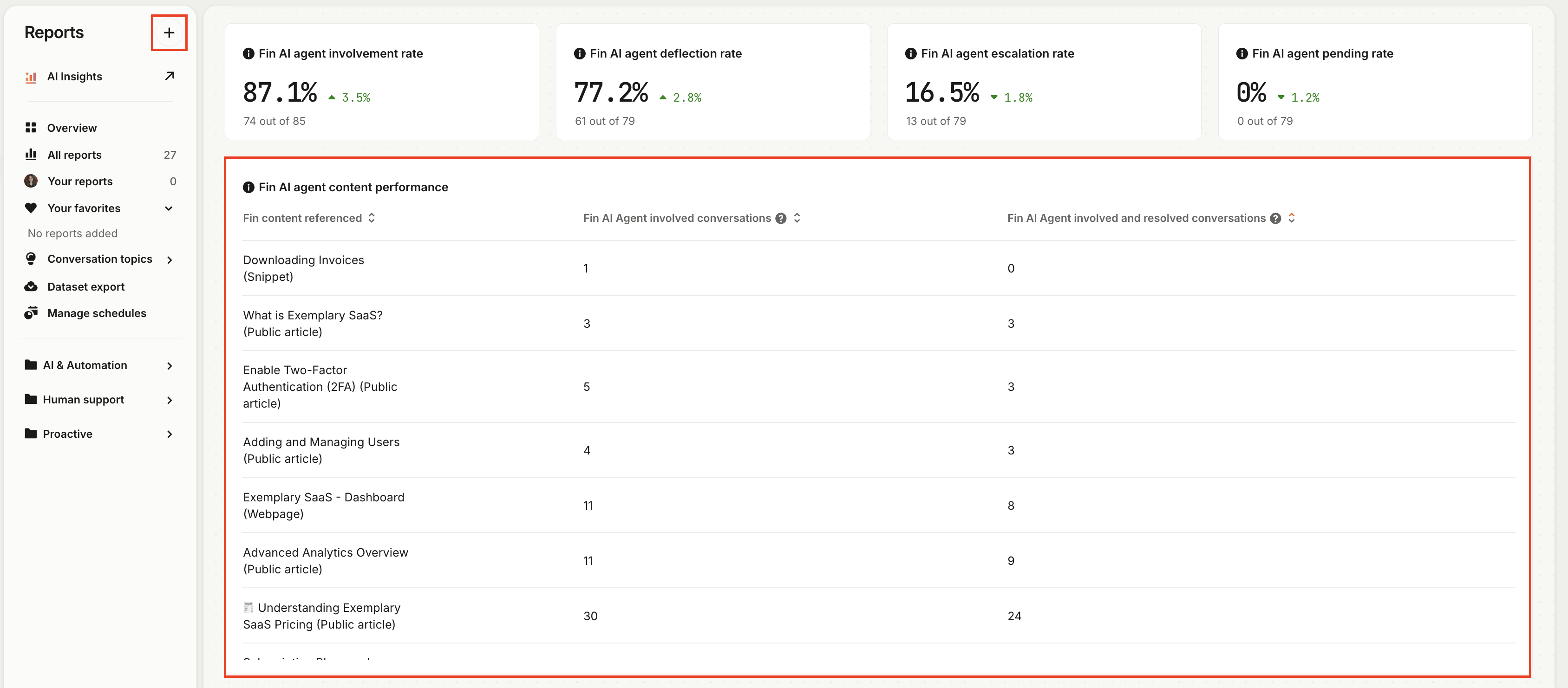
Fin AI Agent content performance report

Here’s what this shows: for each piece of content Fin referenced, how many of those conversations actually resolved?

Take “Subscription Plans and Optional Modules”, referenced in 41 conversations with 34 resolved. That content is doing its job. Now look at “Enable Two-Factor Authentication”, referenced in 5 conversations with only 3 resolved.

That gap is worth investigating. Is the content incomplete? Is it hard for Fin to parse? Or is 2FA just a topic that tends to need more human involvement no matter what? Dive into the conversations to find out why.

Don’t forget your oldest content

One more thing worth building into your rhythm: auditing content by how long ago it was last updated. Old content drifts. Policies change, products ship, and nobody goes back to fix the article from two years ago. Fin doesn’t know the difference between accurate and outdated content, it uses what’s there.

So pick a manageable batch each week, block out the time, and work through it by asking, “Is this still accurate? Is it written in a way Fin can actually use?” Done consistently, this habit compounds, and it’s exactly what our most successful customers do.

How do you know it worked?

Once you’ve made a change, give it a few days of conversation volume. Then go back to Topics Explorer and check the resolution rate on that topic. If it’s moved, the fix landed. If it’s still flagging in Recommendations, keep reviewing and actioning them regularly.

The loop is simple: each time you find the gap, diagnose the type, fix it, and verify, Fin gets a little better.

How to sustain it

If you’ve read this far and you’re thinking “this is a lot of work,” you’re right. The teams who do it best usually have someone dedicated to it, whether that’s a senior teammate, a subject matter expert, or a role you build out over time or hire for. Treating your knowledge base as core infrastructure, with clear ownership, is what turns gap-closing from a one-off project into a steady climb in resolution rate.



What’s next?

You now have a repeatable loop for finding, diagnosing, and closing the content gaps holding your resolution rate back. So what now?

Take the next step...

Closing content gaps is one part of scaling an existing Fin deployment. The full course covers prioritizing your roadmap, expanding to new channels and audiences, monitoring quality, and sustaining performance over time.

About this course


Every content gap is a conversation Fin couldn’t close. Multiply that across your volume as you scale, and you start to see how much of your resolution rate is really a content problem in disguise. The good news is that it’s also the most fixable problem you have.

Prerequisites

Before you work through this lesson, it helps to have the following in place:

  • Fin is live: You already have Fin deployed and automating some of your informational queries. This lesson is about improving an existing deployment, not standing one up.
  • Familiarity with Fin’s core components: If you’re newer to Fin, start with the Launch Fin course, which covers launching Fin over chat in an initial pilot.
  • Pro add-on: Enable the Pro add-on to access AI-driven insights.

Video transcript

A content gap is any place where your knowledge base is letting Fin down. This can happen in two ways. There's content that doesn't exist yet, and there's content that exists but isn't serving Fin well. The second one is about optimization. Fin's finding the answer in your content, but can't parse it cleanly enough to give a great response. So when we talk about closing content gaps, there are three ways to fill them. We can add content that's missing, we can edit what's outdated or incomplete, and we can optimize what already exists for the way that AI actually reads and retrieves it. Now, there's a lot of content in most knowledge bases. So where do you even start? Here's a simple framework you can get started with. Start with Resolution Rate. One of the easiest ways to do this is filtering by resolution rates in Topics Explorer. Prioritize the highest volume topics where Fin is getting involved but not fully resolving. The darker the tiles, the lower the resolution rates. An AI generated summary of all the customer questions in a topic helps us understand what they're actually asking about. And we can dive into individual conversations too and see exactly how customers are phrasing things. Then we find the content that's supposed to be answering them and audit it. Do we need to add a new content source? Does the existing one need to be updated? Or does it just need to be restructured so Fin can actually use it? And by the way, don't feel like you need to do this alone. Get the right people involved, subject matter experts or your own support team, and work through this audit together. Once you've prioritized high volume topics affecting your resolution rate, there's a second way to prioritize: creation dates. Go to your Knowledge Base and sort your content by how old it is or when it was last updated. The truth is old content drifts, policies change, product updates, nobody really goes back to fix the article from months or even years ago. So pick a manageable batch each week, block out some time, and do a simple audit. Is this still accurate? Is it written in a way that Fin can easily parse and use? Between those two approaches to closing content gaps, you'll massively improve the quality of Fin's answers. So make sure you make it a regular habit and keep going until Fin's answering every topic it handles really well. Now there's more than one place in the product where you can find all of this information to close content gaps. And in the text part of this lesson, we'll guide you on how to use each one to start closing those gaps. And look, this is real work, the kind that benefits from having someone dedicated to it. In a later lesson, we'll show you how our own team approached this and actually shaped a whole world around it called AI Knowledge Manager. You'll hear what that looks like in practice so you can take what works for you and build something that fits your needs.


First, how to find content gaps

As the video covered, the product has tools that surface gaps for you. But before you reach for them, it’s worth understanding the thinking behind it. Once you have the lens, you’ll start seeing signals everywhere, even beyond the methods below.

The most reliable signal you have is a conversation Fin didn’t resolve. When Fin gets involved and the conversation still escalates, it means something broke down. Most of the time, though not always, it comes back to content: either the answer doesn’t exist, or it exists but isn’t good enough for Fin to use.

A lot of teams jump straight to writing new content when they see a gap. Often the content is already there, just written in a way that makes it hard for Fin to extract a clean, useful answer.

Where this shows up in the product

Now that you have the framework, here’s where to go looking. The underlying logic is always the same: find a topic where Fin’s resolution rate or involvement is telling you something is off, narrow down the content serving that topic, and audit it. The tools below just make that easier.

  • Recommendations: Your most direct starting point. Fin analyzes every conversation it couldn’t resolve and surfaces ranked suggestions, ordered by impact. Go to Fin AI Agent → Optimize → Recommendations. Before you act on anything, read the source conversations first. They’ll tell you whether you’re dealing with a missing-content problem or a quality problem, and that’s the call only you can make. For a full walkthrough, watch Optimize Fin instantly with the help of AI.
  • Topics Explorer: Where you go when you want to find the problem yourself rather than wait for Recommendations to surface it. Go to Fin AI Agent → Analyze → Topics and sort by involvement rate. The darker the tile, the lower the resolution rate. Pick a high-volume, underperforming topic, open the AI-generated summary to understand what customers are actually asking, and drill into individual conversations to see how they’re phrasing things. From there you can trace back to the content and audit it directly.
  • Content performance: Found in Fin AI Agent’s performance report, this catches a different kind of gap: content Fin is actively using that still isn’t driving resolution. Go to Reports, create a report on Fin AI Agent’s performance, and scroll down to Fin AI Agent content performance.

Fin AI Agent content performance report

Here’s what this shows: for each piece of content Fin referenced, how many of those conversations actually resolved?

Take “Subscription Plans and Optional Modules”, referenced in 41 conversations with 34 resolved. That content is doing its job. Now look at “Enable Two-Factor Authentication”, referenced in 5 conversations with only 3 resolved.

That gap is worth investigating. Is the content incomplete? Is it hard for Fin to parse? Or is 2FA just a topic that tends to need more human involvement no matter what? Dive into the conversations to find out why.

Don’t forget your oldest content

One more thing worth building into your rhythm: auditing content by how long ago it was last updated. Old content drifts. Policies change, products ship, and nobody goes back to fix the article from two years ago. Fin doesn’t know the difference between accurate and outdated content, it uses what’s there.

So pick a manageable batch each week, block out the time, and work through it by asking, “Is this still accurate? Is it written in a way Fin can actually use?” Done consistently, this habit compounds, and it’s exactly what our most successful customers do.

How do you know it worked?

Once you’ve made a change, give it a few days of conversation volume. Then go back to Topics Explorer and check the resolution rate on that topic. If it’s moved, the fix landed. If it’s still flagging in Recommendations, keep reviewing and actioning them regularly.

The loop is simple: each time you find the gap, diagnose the type, fix it, and verify, Fin gets a little better.

How to sustain it

If you’ve read this far and you’re thinking “this is a lot of work,” you’re right. The teams who do it best usually have someone dedicated to it, whether that’s a senior teammate, a subject matter expert, or a role you build out over time or hire for. Treating your knowledge base as core infrastructure, with clear ownership, is what turns gap-closing from a one-off project into a steady climb in resolution rate.


What’s next?

You now have a repeatable loop for finding, diagnosing, and closing the content gaps holding your resolution rate back. So what now?

Take the next step...

Closing content gaps is one part of scaling an existing Fin deployment. The full course covers prioritizing your roadmap, expanding to new channels and audiences, monitoring quality, and sustaining performance over time.