Start free trial Webinars Certifications Catalog

Expand Fin to additional channels

Deploy Fin across phone, WhatsApp, social, SMS, Slack, Discord, and custom channels.

rate limit

Code not recognized.

About this course


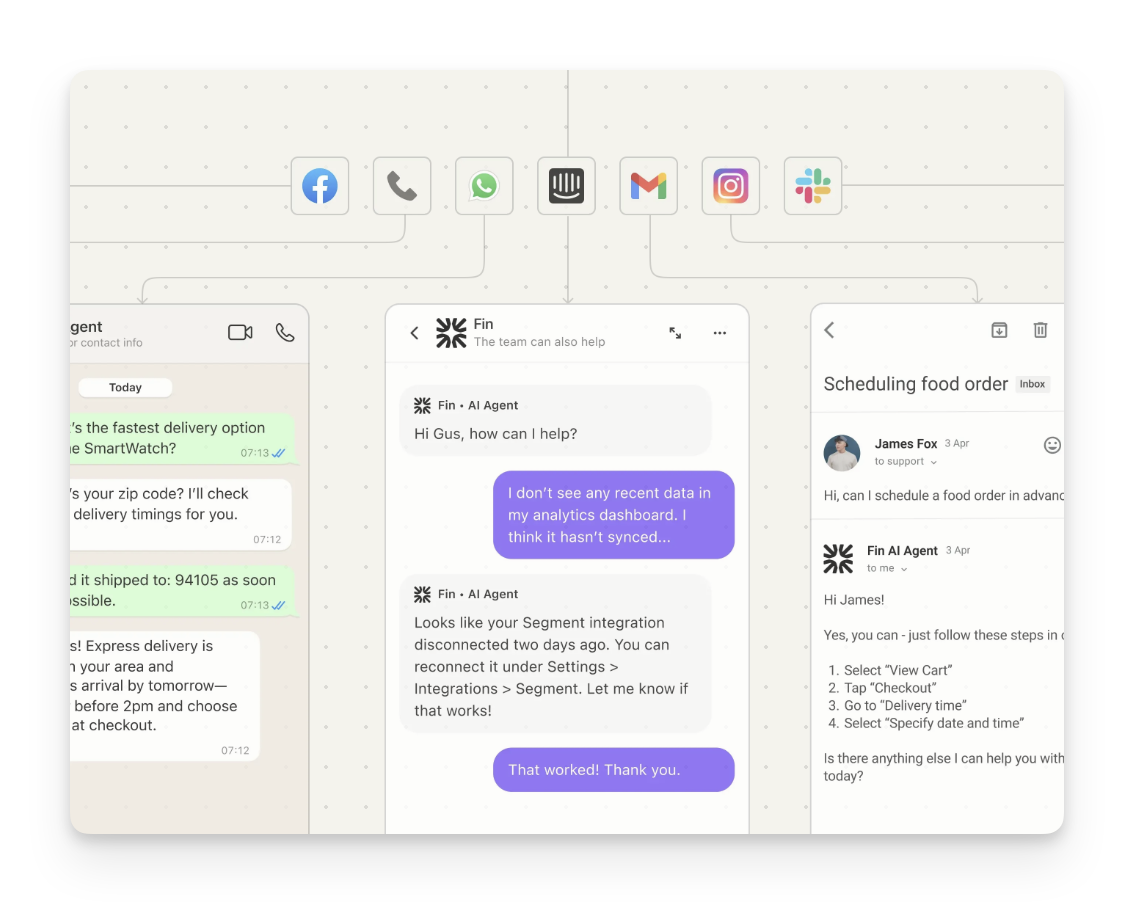
After deploying Fin over web messenger and email, it's time to consider expanding to every other channel your customers use: phone, WhatsApp, Facebook Messenger, Instagram, SMS, Slack, Discord, and even your own custom surfaces. Each one lets Fin help more customers on their preferred channel, and each comes with its own nuances to plan for.

Prerequisites

Before you work through this lesson, it helps to have the following in place:

  • Fin is live on your primary channels: Fin should be deployed and performing well on web chat (Messenger) and email before you expand to additional channels.
  • Familiarity with Fin’s core components: If you’re newer to Fin, start with the Launch Fin course, which covers launching Fin over chat in an initial pilot.

First, visit Performance to review your support volume by channel and see which channels to prioritize deploying Fin to.
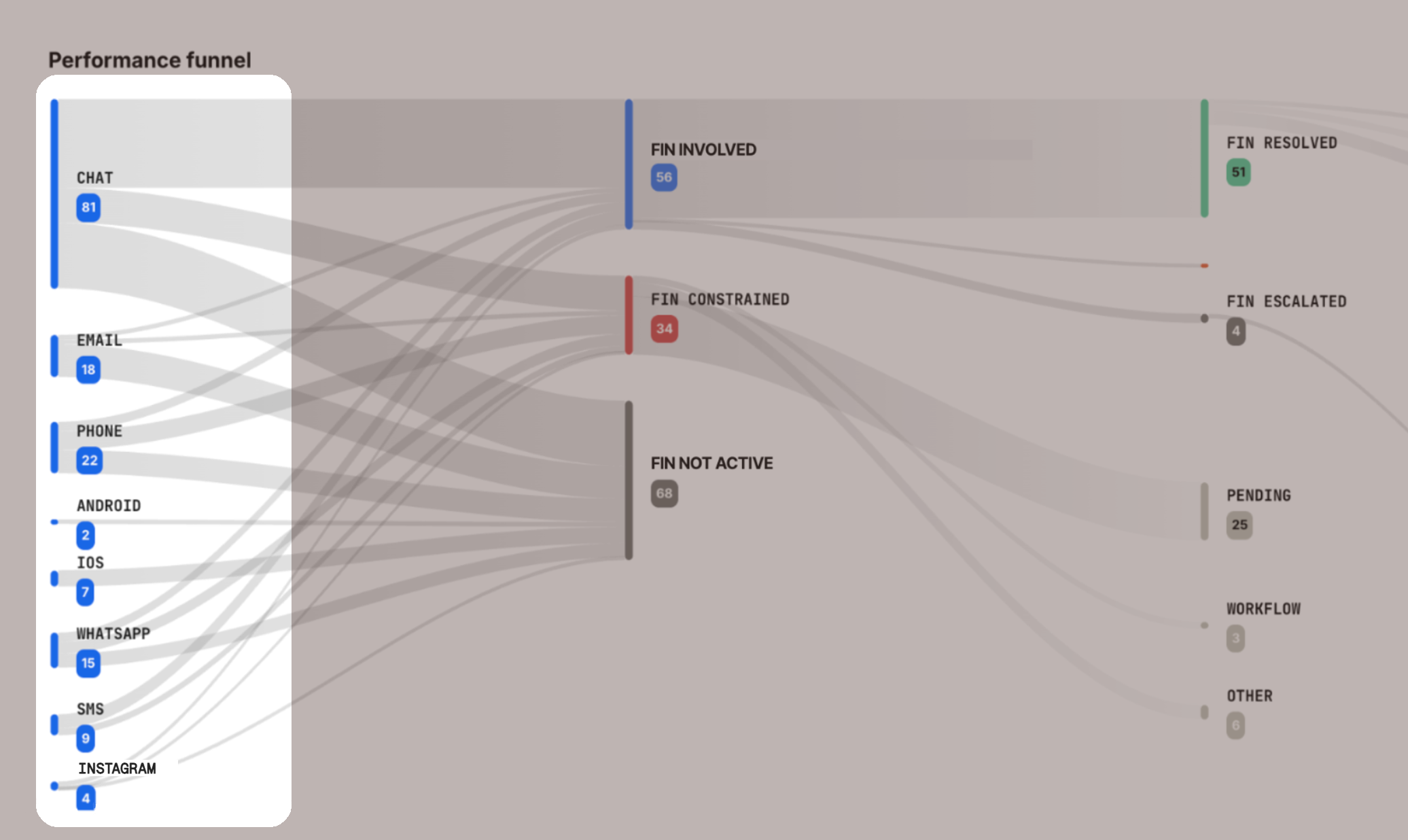
Support volume by channel breakdown

You can deploy Fin AI Agent across all of your additional inbound support channels. Each comes with its own nuances to plan for.

Select a channel to go straight to its specific details.

Phone (Fin Voice): Natural, brand-aligned conversations that answer calls instantly and resolve issues without hold times or rigid IVR menus.
WhatsApp: Fast, personal support delivered right where customers already chat, with a friendlier tone and rich media.
Facebook Messenger: Quick, on-brand answers that meet customers on the platform they check daily, with a supportive, neutral tone.
Instagram: Snappy, brand-voiced replies that match the fast, casual pace customers expect on the platform.
SMS: Concise, conversational resolutions that reach customers anywhere, no app or login required.
Slack: Threaded, native-feeling support inside community or Connect channels, working alongside your team in full view.
Discord: Seamless support inside your community’s existing conversations, with replies that stay in-thread and feel native.
API / Custom Channel: Embed Fin’s resolution power directly into your own app or interface, fully under your brand, with complete control over the experience.

Note: Deploy Fin on a fresh workflow for each channel you add. Workflow templates are available for Slack, Instagram, WhatsApp, Facebook Messenger, and more, so you don’t have to start from scratch.

Channel-specific details

Phone

Fin Voice is Intercom’s AI Agent for phone support, designed to deliver natural, brand-aligned conversations without IVR menus or long wait times.
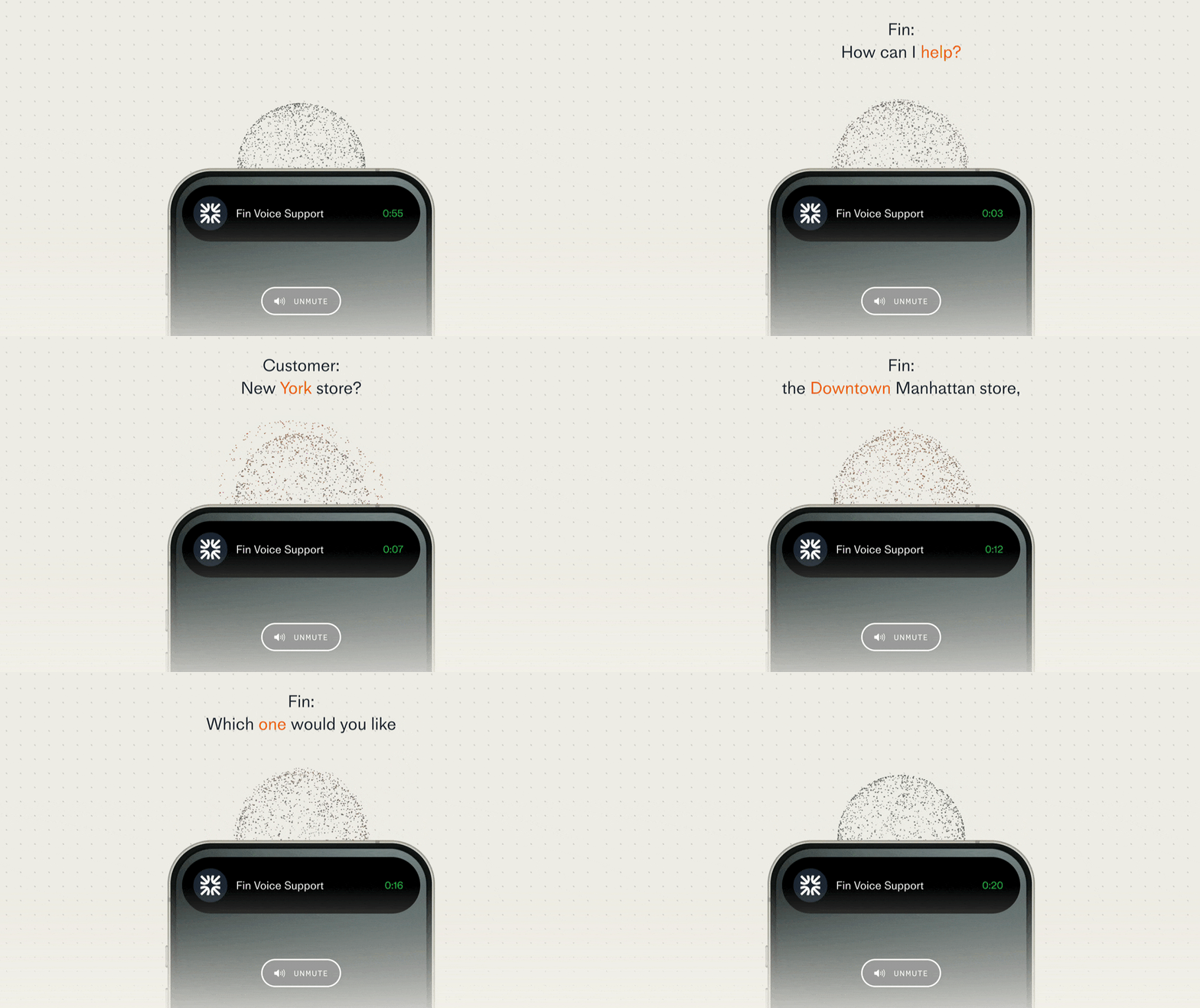
Fin Voice answering a call

Fin Voice integrates natively with Intercom Phone, and can also connect to a wide range of third-party telephony providers.

Note: Fin Voice is currently limited to select customers partnered with our Sales team. It’s supported on workspaces hosted in the US, EU, and Australia. If you’d like to learn more about pricing, reach out to your Account Manager.

For this channel, you’ll select from a set of available AI voices, and can preview each one to hear sample greetings and responses before going live. This helps confirm the voice, language, and tone match your brand and customer expectations.
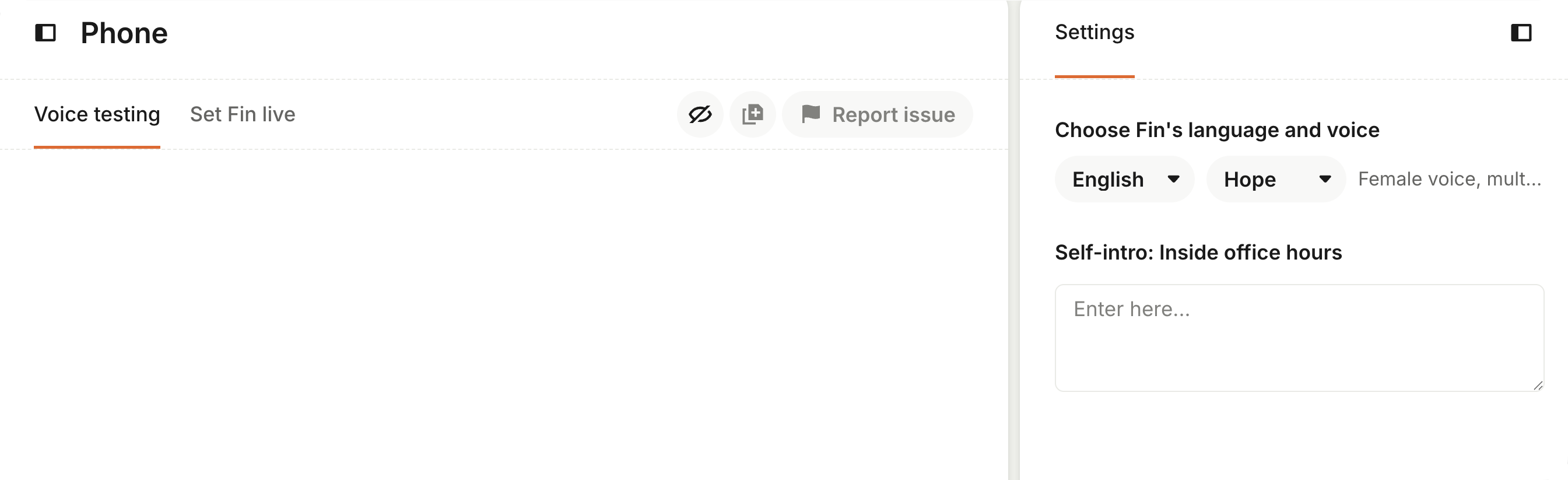
Previewing AI voices

Fin Voice escalations

You can configure different greetings and escalation behavior for in-hours and out-of-hours calls, so customers always get a relevant response.
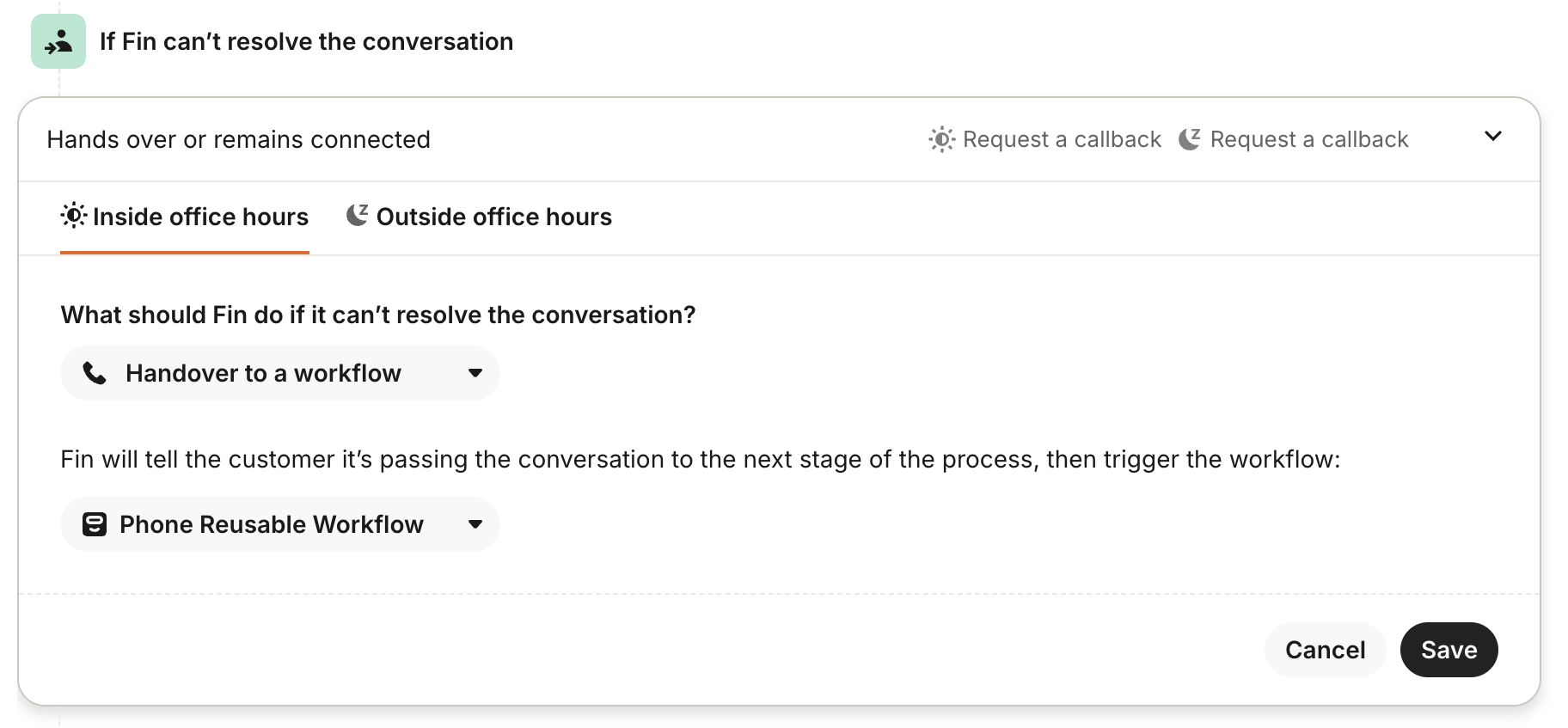
In-hours and out-of-hours call settings

To avoid long wait times, set up clear escalation paths for anything Fin Voice can’t resolve. Use Fin Attributes to route calls to the right place fast.

When a call escalates, Fin Voice hands over a transcript and summary, so teammates can pick up the conversation without asking the customer to repeat themselves.
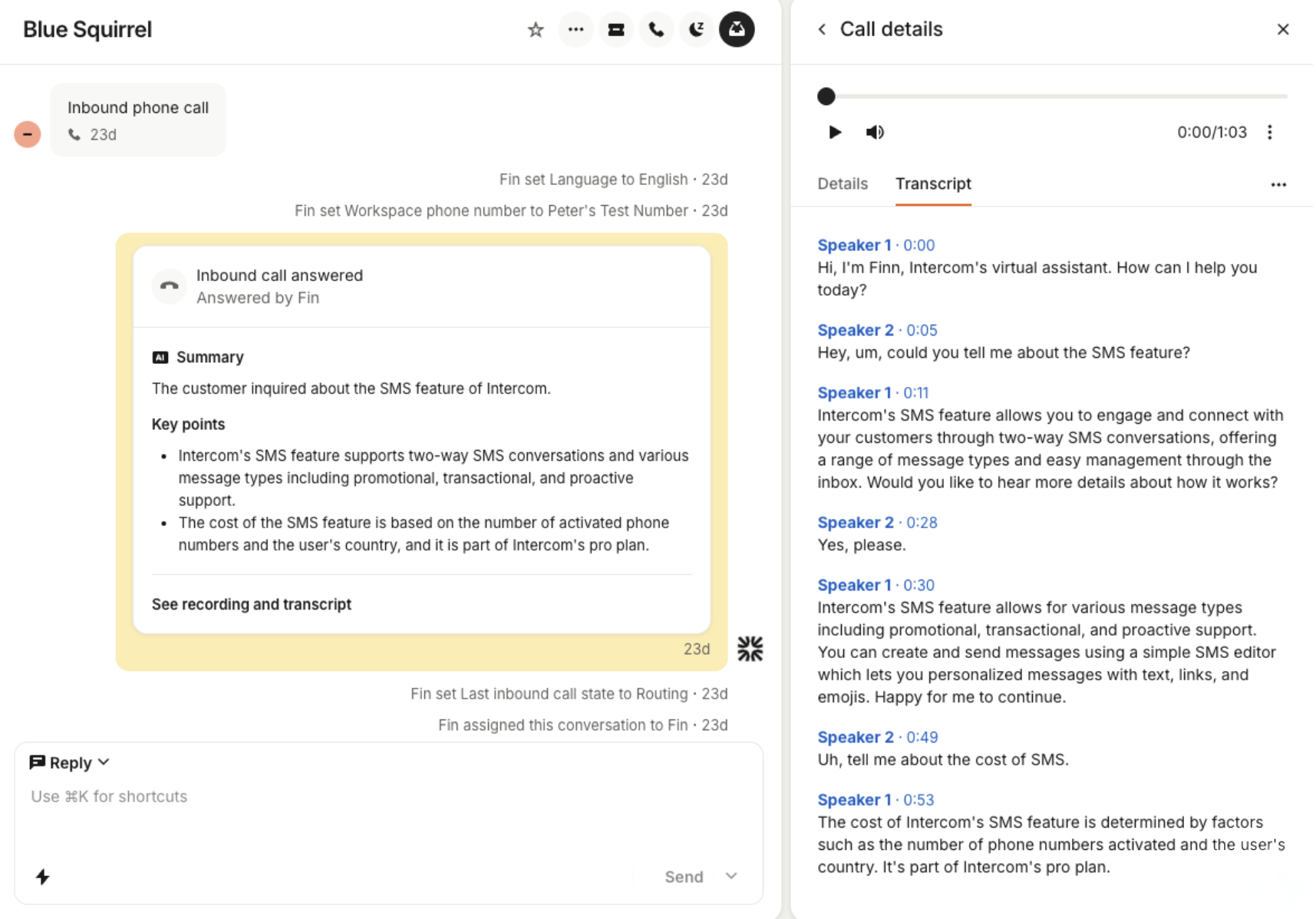
Call transcript and summary handover

Learn more about deploying Fin Voice.

Back to top

SMS

SMS is ideal for reaching customers outside your app or website, but it comes with its own constraints. Replies are limited to 1,600 characters, and Fin adapts accordingly:

  • Conversational replies: Fin responds conversationally, just like it does on Messenger.
  • No source links: Source URLs are left out of SMS replies to keep messages clean.
  • No reply buttons: Fin always handles feedback conversationally.
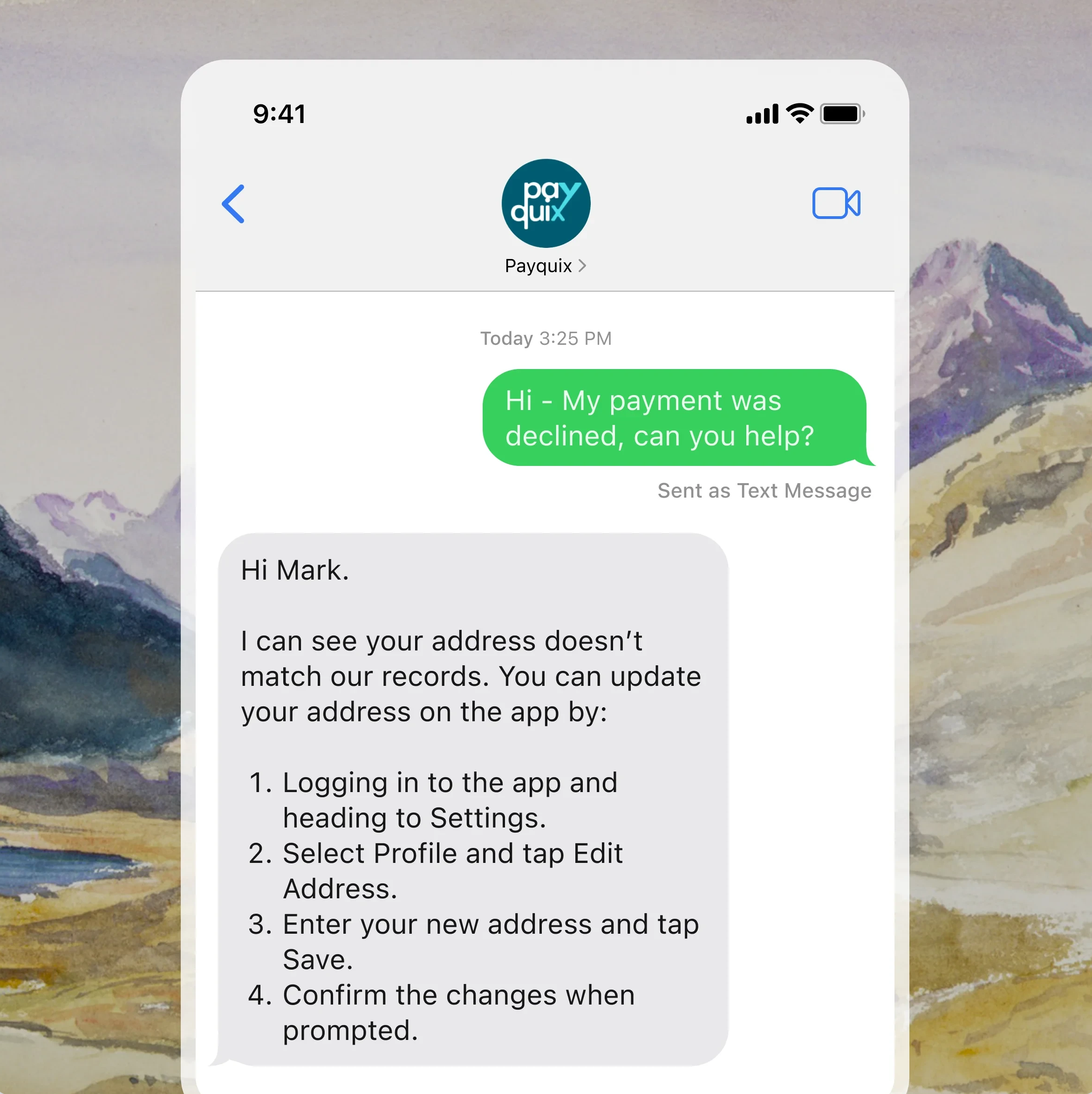
Fin replying over SMS

Note: images and rich media aren’t supported for outbound SMS. Fin can only send and receive text and links.

It’s worth setting quiet hours to control when messages go out, and a reasonable inactivity window to close conversations customers don’t reply to (similar to your other chat channels). You can use Workflows to set different auto-close rules per channel.
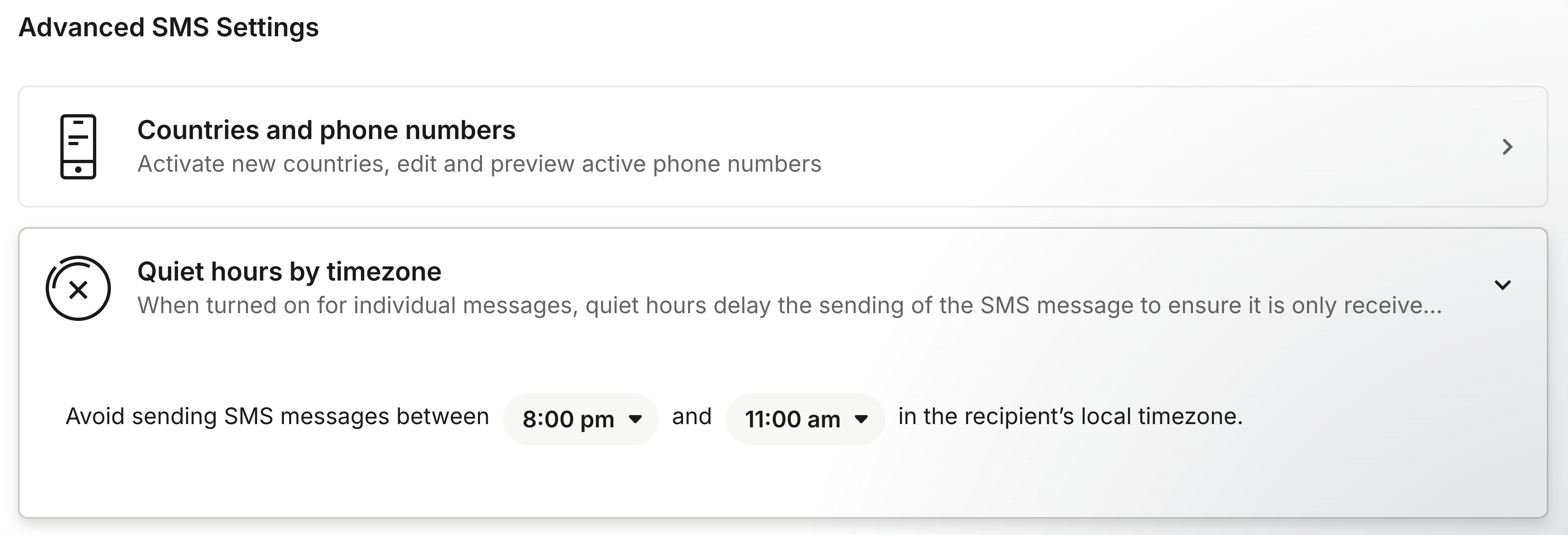
Quiet hours settings

Deploy Fin over SMS alongside your other live chat channels, under Fin AI Agent → Deploy → Chat.

Learn more about setting up a 2-way SMS channel.

Back to top

WhatsApp

WhatsApp is probably the highest-expectation channel you’ll deploy Fin on. Customers treat it as a personal, trusted channel, and expect fast, considered replies, so it’s worth getting channel-specific guidance right from day one.
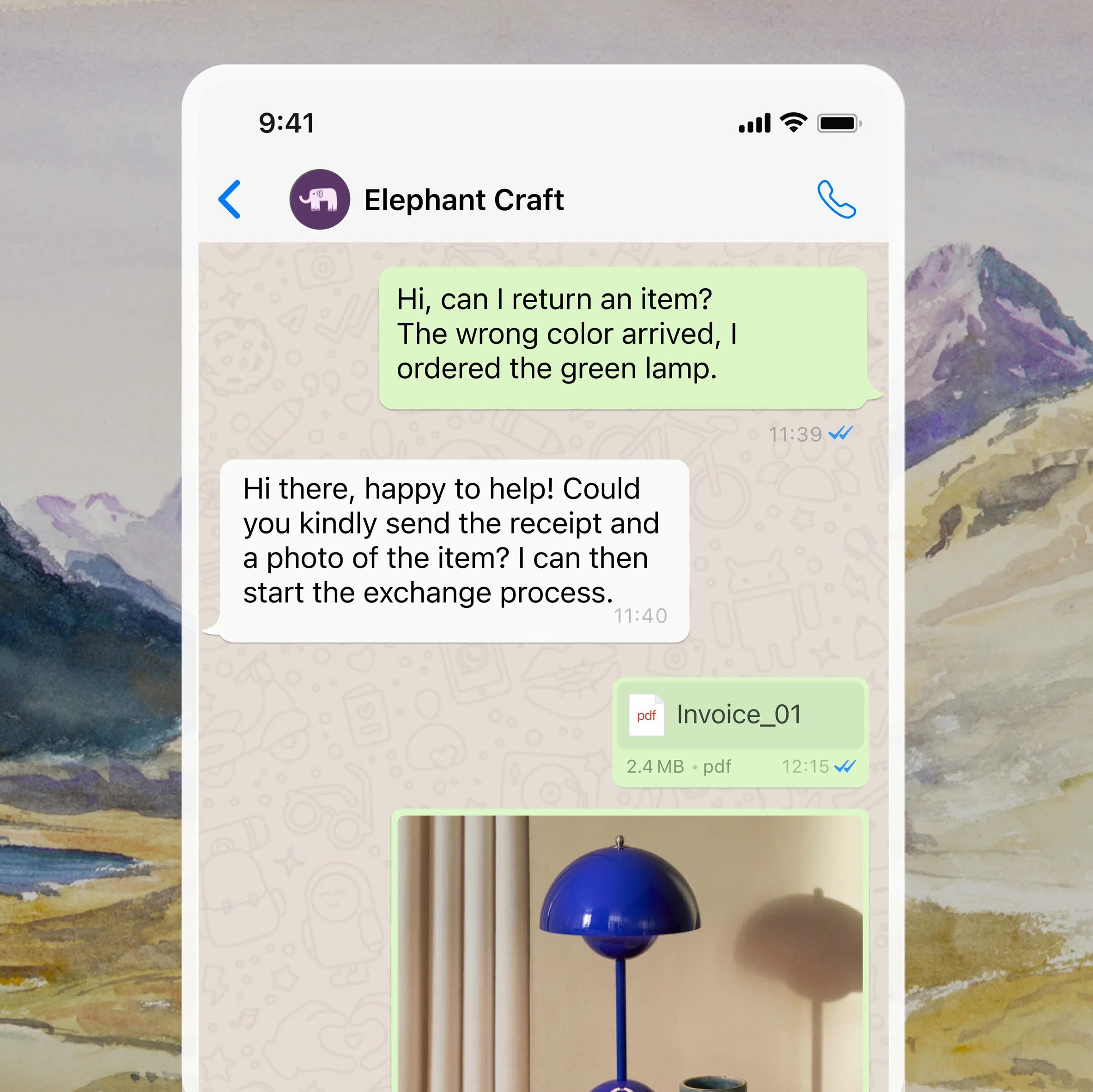
Fin replying over WhatsApp

You’ll connect WhatsApp via Settings → Channels → WhatsApp using an OAuth flow (this runs on the WhatsApp Business Platform, not personal WhatsApp). Once connected, deploy Fin on a dedicated workflow for WhatsApp at Fin AI Agent → Deploy → Chat.

Note: Meta’s customer care window policy means Fin can only send a free-form reply if the customer messaged within the last 24 hours. It’s worth setting WhatsApp conversations to auto-close within the 24-hour window. Read more about Meta’s 24 hour customer care window.

Good to know: voice notes are automatically transcribed, and Fin responds to the transcribed text. No setup required.

Communication style: WhatsApp should feel personal and direct, warmer than your standard web chat (though not necessarily casual). If your existing communication style guidance defaults to something more formal or corporate, write WhatsApp-specific guidance to adjust for it.

Back to top

Social channels (Facebook Messenger, Instagram)

Social channels call for a relatively casual, responsive tone, with replies that are brief and engaging, but these two platforms aren’t identical.
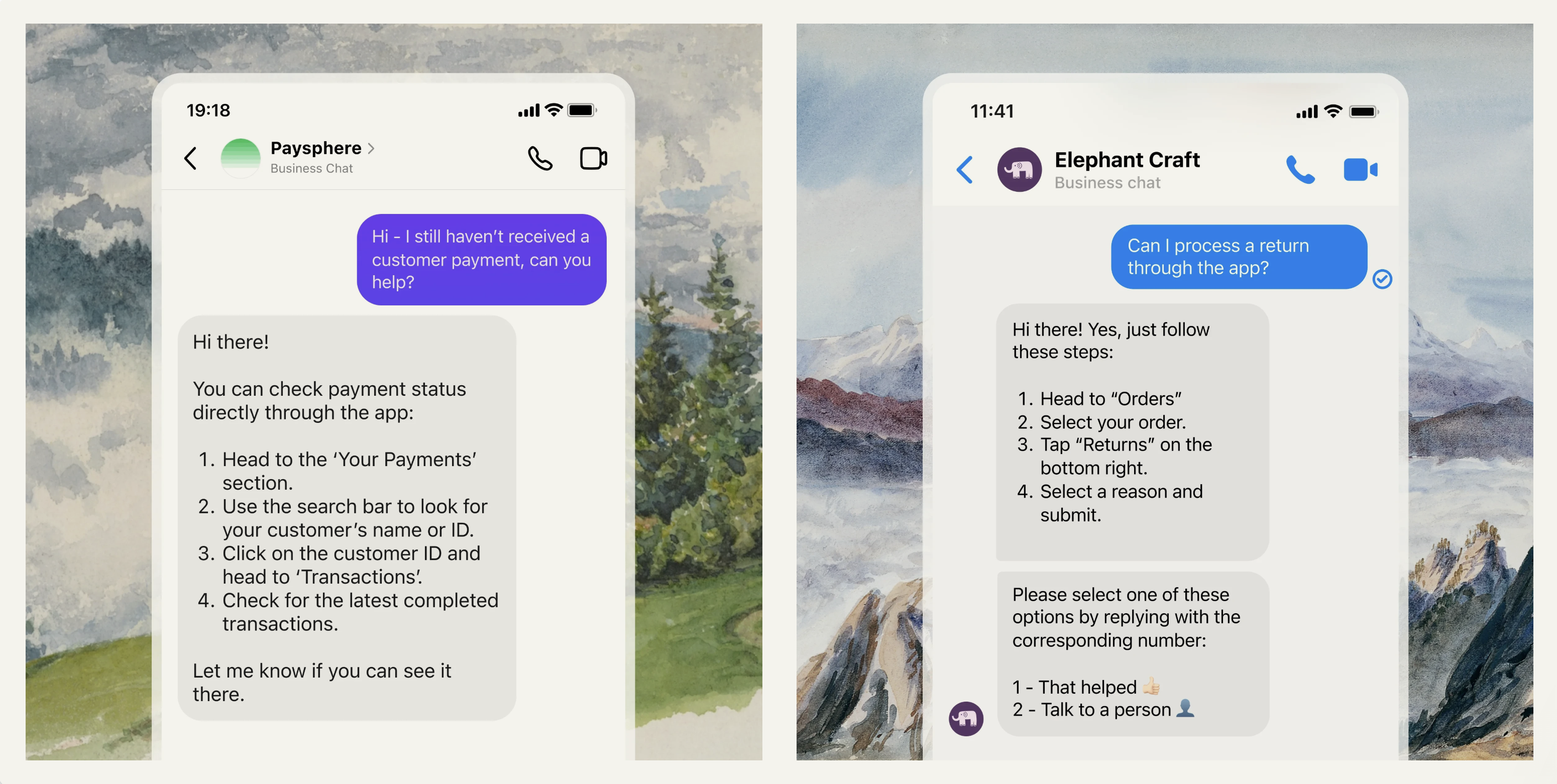
Fin replying on social channels

Instagram

Instagram brings in three message types: direct messages, story replies, and story mentions, all of which route to your Inbox and get treated the same way as any other inbound conversation.

Instagram has a 7-day conversation window: if neither you nor the customer sends a message within 7 days, the thread closes.

On tone, Instagram skews shorter and more brand-expressive, so expect quick, punchy responses rather than long-form answers.

Facebook Messenger

Facebook Messenger follows a 24-hour customer reply window instead (same rule as WhatsApp): a customer needs to have messaged within the last 24 hours for Fin to reply with free-form text.

Messenger also only supports text and image replies for outbound messages, no rich formatting.

Communication style: compared to Instagram, Messenger customers expect fuller, more support-oriented responses. Think of it as the neutral middle ground between Instagram’s brevity and WhatsApp’s warmth.

Deploy Fin over Facebook Messenger or Instagram alongside your other live chat channels, under Fin AI Agent → Deploy → Chat. Use Workflows to set different auto-close rules per channel. Both should have a relatively short inactivity window of a few minutes.

Learn more about connecting your Facebook or Instagram channels.

Back to top

Slack

Deploying Fin in Slack enables seamless support inside a community workspace or a private Slack channel, where conversations are informal and quick. Fin’s replies should match that: concise, friendly, and responsive.
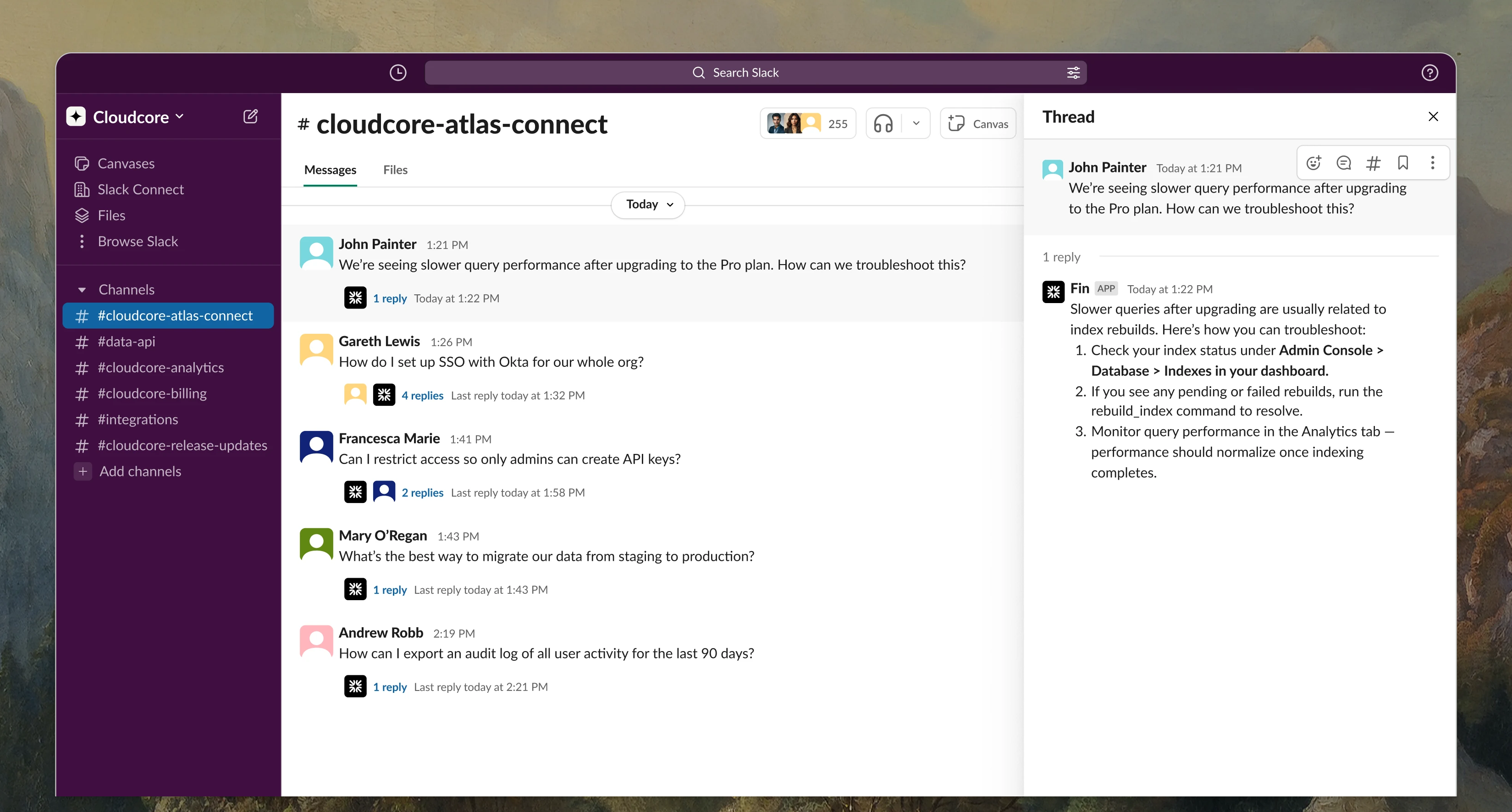
Fin replying in Slack

Go to Settings → Channels → Slack to set triggers that control when Fin gets involved in Slack conversations, so support effort stays focused where it’s needed.
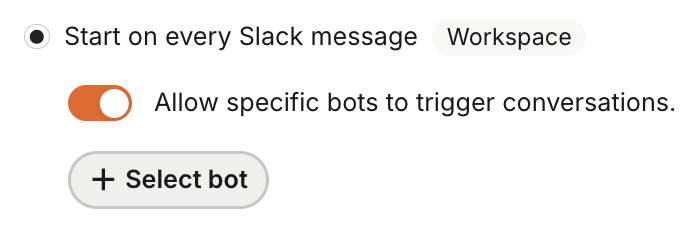
Slack trigger settings

Note: Fin’s data connectors are disabled by default for Slack, to prevent sharing sensitive information. Only enable them for trusted, private workspaces. Enabling them on a public Slack workspace can expose information you don’t want exposed.

Deploy Fin over Slack alongside your other live chat channels, under Fin AI Agent → Deploy → Chat. You’ll need to connect your Intercom workspace to Slack first.

Back to top

Discord

Deploying Fin on your Discord server means it can support customers who favor this channel. When a customer messages in a connected Discord channel, it creates a new conversation in your Intercom Inbox (tagged with a Discord icon), and replies from Fin post back to the same Discord thread.
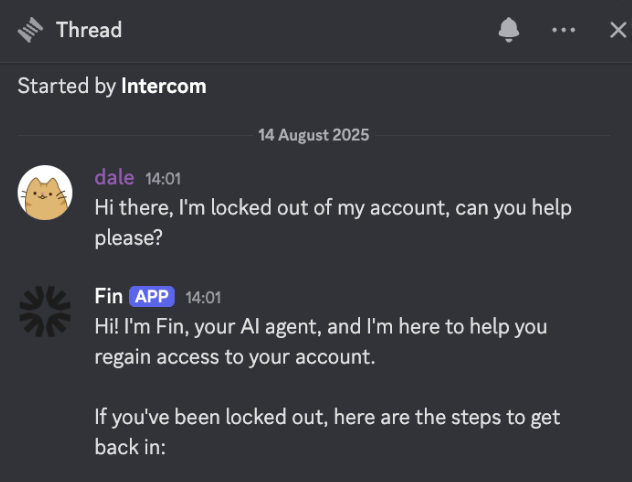
Fin replying in Discord

Connect it via Settings → Channels → Discord. You’ll go through an OAuth flow to authorize the Intercom Discord Bot, which requires server administrator rights. If you manage multiple servers, make sure you select the right one.

Once connected, set Fin live the same way as any other chat channel. Create a dedicated workflow at Fin AI Agent → Deploy → Chat and target Discord in the trigger’s audience settings.

Note: Discord channels support a maximum of 10 webhooks. If a channel is already at that limit, adding Intercom will fail, so check under Edit Channel → Integrations → Webhooks in Discord before connecting. The Intercom Inbox also doesn’t support all of Discord’s rich formatting (nested or multi-level lists, for example).

For private conversations, right-click a message in Discord and select Apps → Intercom → Create Private Conversation.

Back to top

API / Custom channel

If you want to embed Fin in a custom surface or proprietary app rather than a supported channel, the API channel supports this through an event-driven architecture. It’s currently under managed availability, so you’ll need to engage your account team to scope this out.

Learn more in Fin AI Agent API.

Back to top


With Fin on the frontline across all your inbound channels, customers get fast, consistent answers everywhere they reach out, and your team gets to focus on the issues where they are most valuable.



What’s next?

Fin is now ready to meet your customers on every channel they use, not just web chat and email. So what now?

Take the next step...

Expanding to new channels is one part of scaling an existing Fin deployment. The full course covers prioritizing your roadmap, expanding into new regions, languages, and audiences, monitoring quality, and sustaining performance over time.

About this course


After deploying Fin over web messenger and email, it's time to consider expanding to every other channel your customers use: phone, WhatsApp, Facebook Messenger, Instagram, SMS, Slack, Discord, and even your own custom surfaces. Each one lets Fin help more customers on their preferred channel, and each comes with its own nuances to plan for.

Prerequisites

Before you work through this lesson, it helps to have the following in place:

  • Fin is live on your primary channels: Fin should be deployed and performing well on web chat (Messenger) and email before you expand to additional channels.
  • Familiarity with Fin’s core components: If you’re newer to Fin, start with the Launch Fin course, which covers launching Fin over chat in an initial pilot.

First, visit Performance to review your support volume by channel and see which channels to prioritize deploying Fin to.

Support volume by channel breakdown

You can deploy Fin AI Agent across all of your additional inbound support channels. Each comes with its own nuances to plan for.

Select a channel to go straight to its specific details.

Phone (Fin Voice): Natural, brand-aligned conversations that answer calls instantly and resolve issues without hold times or rigid IVR menus.
WhatsApp: Fast, personal support delivered right where customers already chat, with a friendlier tone and rich media.
Facebook Messenger: Quick, on-brand answers that meet customers on the platform they check daily, with a supportive, neutral tone.
Instagram: Snappy, brand-voiced replies that match the fast, casual pace customers expect on the platform.
SMS: Concise, conversational resolutions that reach customers anywhere, no app or login required.
Slack: Threaded, native-feeling support inside community or Connect channels, working alongside your team in full view.
Discord: Seamless support inside your community’s existing conversations, with replies that stay in-thread and feel native.
API / Custom Channel: Embed Fin’s resolution power directly into your own app or interface, fully under your brand, with complete control over the experience.

Note: Deploy Fin on a fresh workflow for each channel you add. Workflow templates are available for Slack, Instagram, WhatsApp, Facebook Messenger, and more, so you don’t have to start from scratch.

Channel-specific details

Phone

Fin Voice is Intercom’s AI Agent for phone support, designed to deliver natural, brand-aligned conversations without IVR menus or long wait times.

Fin Voice answering a call

Fin Voice integrates natively with Intercom Phone, and can also connect to a wide range of third-party telephony providers.

Note: Fin Voice is currently limited to select customers partnered with our Sales team. It’s supported on workspaces hosted in the US, EU, and Australia. If you’d like to learn more about pricing, reach out to your Account Manager.

For this channel, you’ll select from a set of available AI voices, and can preview each one to hear sample greetings and responses before going live. This helps confirm the voice, language, and tone match your brand and customer expectations.

Previewing AI voices

Fin Voice escalations

You can configure different greetings and escalation behavior for in-hours and out-of-hours calls, so customers always get a relevant response.

In-hours and out-of-hours call settings

To avoid long wait times, set up clear escalation paths for anything Fin Voice can’t resolve. Use Fin Attributes to route calls to the right place fast.

When a call escalates, Fin Voice hands over a transcript and summary, so teammates can pick up the conversation without asking the customer to repeat themselves.

Call transcript and summary handover

Learn more about deploying Fin Voice.

Back to top

SMS

SMS is ideal for reaching customers outside your app or website, but it comes with its own constraints. Replies are limited to 1,600 characters, and Fin adapts accordingly:

  • Conversational replies: Fin responds conversationally, just like it does on Messenger.
  • No source links: Source URLs are left out of SMS replies to keep messages clean.
  • No reply buttons: Fin always handles feedback conversationally.

Fin replying over SMS

Note: images and rich media aren’t supported for outbound SMS. Fin can only send and receive text and links.

It’s worth setting quiet hours to control when messages go out, and a reasonable inactivity window to close conversations customers don’t reply to (similar to your other chat channels). You can use Workflows to set different auto-close rules per channel.

Quiet hours settings

Deploy Fin over SMS alongside your other live chat channels, under Fin AI Agent → Deploy → Chat.

Learn more about setting up a 2-way SMS channel.

Back to top

WhatsApp

WhatsApp is probably the highest-expectation channel you’ll deploy Fin on. Customers treat it as a personal, trusted channel, and expect fast, considered replies, so it’s worth getting channel-specific guidance right from day one.

Fin replying over WhatsApp

You’ll connect WhatsApp via Settings → Channels → WhatsApp using an OAuth flow (this runs on the WhatsApp Business Platform, not personal WhatsApp). Once connected, deploy Fin on a dedicated workflow for WhatsApp at Fin AI Agent → Deploy → Chat.

Note: Meta’s customer care window policy means Fin can only send a free-form reply if the customer messaged within the last 24 hours. It’s worth setting WhatsApp conversations to auto-close within the 24-hour window. Read more about Meta’s 24 hour customer care window.

Good to know: voice notes are automatically transcribed, and Fin responds to the transcribed text. No setup required.

Communication style: WhatsApp should feel personal and direct, warmer than your standard web chat (though not necessarily casual). If your existing communication style guidance defaults to something more formal or corporate, write WhatsApp-specific guidance to adjust for it.

Back to top

Social channels (Facebook Messenger, Instagram)

Social channels call for a relatively casual, responsive tone, with replies that are brief and engaging, but these two platforms aren’t identical.

Fin replying on social channels

Instagram

Instagram brings in three message types: direct messages, story replies, and story mentions, all of which route to your Inbox and get treated the same way as any other inbound conversation.

Instagram has a 7-day conversation window: if neither you nor the customer sends a message within 7 days, the thread closes.

On tone, Instagram skews shorter and more brand-expressive, so expect quick, punchy responses rather than long-form answers.

Facebook Messenger

Facebook Messenger follows a 24-hour customer reply window instead (same rule as WhatsApp): a customer needs to have messaged within the last 24 hours for Fin to reply with free-form text.

Messenger also only supports text and image replies for outbound messages, no rich formatting.

Communication style: compared to Instagram, Messenger customers expect fuller, more support-oriented responses. Think of it as the neutral middle ground between Instagram’s brevity and WhatsApp’s warmth.

Deploy Fin over Facebook Messenger or Instagram alongside your other live chat channels, under Fin AI Agent → Deploy → Chat. Use Workflows to set different auto-close rules per channel. Both should have a relatively short inactivity window of a few minutes.

Learn more about connecting your Facebook or Instagram channels.

Back to top

Slack

Deploying Fin in Slack enables seamless support inside a community workspace or a private Slack channel, where conversations are informal and quick. Fin’s replies should match that: concise, friendly, and responsive.

Fin replying in Slack

Go to Settings → Channels → Slack to set triggers that control when Fin gets involved in Slack conversations, so support effort stays focused where it’s needed.

Slack trigger settings

Note: Fin’s data connectors are disabled by default for Slack, to prevent sharing sensitive information. Only enable them for trusted, private workspaces. Enabling them on a public Slack workspace can expose information you don’t want exposed.

Deploy Fin over Slack alongside your other live chat channels, under Fin AI Agent → Deploy → Chat. You’ll need to connect your Intercom workspace to Slack first.

Back to top

Discord

Deploying Fin on your Discord server means it can support customers who favor this channel. When a customer messages in a connected Discord channel, it creates a new conversation in your Intercom Inbox (tagged with a Discord icon), and replies from Fin post back to the same Discord thread.

Fin replying in Discord

Connect it via Settings → Channels → Discord. You’ll go through an OAuth flow to authorize the Intercom Discord Bot, which requires server administrator rights. If you manage multiple servers, make sure you select the right one.

Once connected, set Fin live the same way as any other chat channel. Create a dedicated workflow at Fin AI Agent → Deploy → Chat and target Discord in the trigger’s audience settings.

Note: Discord channels support a maximum of 10 webhooks. If a channel is already at that limit, adding Intercom will fail, so check under Edit Channel → Integrations → Webhooks in Discord before connecting. The Intercom Inbox also doesn’t support all of Discord’s rich formatting (nested or multi-level lists, for example).

For private conversations, right-click a message in Discord and select Apps → Intercom → Create Private Conversation.

Back to top

API / Custom channel

If you want to embed Fin in a custom surface or proprietary app rather than a supported channel, the API channel supports this through an event-driven architecture. It’s currently under managed availability, so you’ll need to engage your account team to scope this out.

Learn more in Fin AI Agent API.

Back to top


With Fin on the frontline across all your inbound channels, customers get fast, consistent answers everywhere they reach out, and your team gets to focus on the issues where they are most valuable.


What’s next?

Fin is now ready to meet your customers on every channel they use, not just web chat and email. So what now?

Take the next step...

Expanding to new channels is one part of scaling an existing Fin deployment. The full course covers prioritizing your roadmap, expanding into new regions, languages, and audiences, monitoring quality, and sustaining performance over time.