
Start free trial Webinars Certifications Catalog

Get started with Fin Operator

Use Fin Operator to analyze your support operation, fix issues, and ship approved improvements from a single conversation.

rate limit

Code not recognized.

About this course


Fin Operator is an agent for your customer operations that allows you to automate operational work, query support data, and build, test, and ship improvements to Fin in seconds. In this lesson, you’ll learn how a single conversation can take you from spotting a problem to shipping the fix.

Prerequisites

To put this lesson into practice, you will need:

  • Fin live in your workspace: Fin Operator draws on your knowledge, metrics, and conversation history, so it works best once Fin is handling real conversations.
  • Access to Fin Operator: You’ll need the Pro add-on and a US-hosted workspace while Operator is in early access.

Video transcript

Fin Operator is for so much more than reporting. It can surface issues, give suggestions, and make approved changes to improve any part of your support setup. Getting the most out of Fin is ongoing work. We're constantly training it, testing changes, deploying, and analyzing performance. And that's exactly what Operator was built for. Because Operator lives in your workspace, it knows your knowledge, your metrics, and how your team works. And through back and forth conversation, you can turn that context into real action. To get the most out of Operator, follow this simple framework. Ask, refine, act. First, come to operator with a goal in mind or a problem you want to solve and give it the context it needs. Next, keep asking questions and clarifying what you need, making sure operator stays on track. And last, get Operator to pin down where the issue actually is and how it can be fixed. It can then draft a solution ready for your review and approval. That's how Operator takes you from quick answers to a real problem solved. Let's look at an example. Let's say Fin escalated a conversation that we think it could have handled by itself. Let's ask operator about it and find out why it handed over. Operator scans the conversation, events, and reasoning, and generates a breakdown. Here's a summary, the step by step of what happened, a root cause, and recommendations. And we could keep asking questions to refine the query, but it looks like Fin has already pinned down the root cause as a knowledge gap. And here, it suggests what we can do about it. Just choose the action, in this case, create an article. Operator will draft one, which we can review and approve instantly. This is just one of the many ways Operator can help you take action and make improvements. Another way to use Operator is to treat it as a consultant, applying the same ask, refine, act framework. We could ask broader operational questions like, how do I get the rate of my billing escalations from thirty percent down to fifteen percent? We could even tell it about something we currently do manually that we'd like to automate. So if we're in the habit of reading through conversations one by one to gauge how customers feel about Fin, we could ask operator to do that for us and surface those insights whenever we need them. One last thing worth mentioning, Operator will never act on anything without your say so. It will always ask for approval first. So if you're new to Operator, start with the simple framework we covered today. Bring it a real problem, keep the conversation going, and ask it to help you find the next best action. That's where operator becomes most valuable, helping you spend less time figuring out where to look and more time improving the customer experience.


Note: Fin Operator is in early access with limited spots. It’s currently available to customers with the Pro add-on, on US-hosted workspaces only. To join the waitlist, go to Fin AI Agent > Operator and select Request early access. Not eligible yet? You can still register your interest, and we’ll notify you as access expands.


What Fin Operator can do

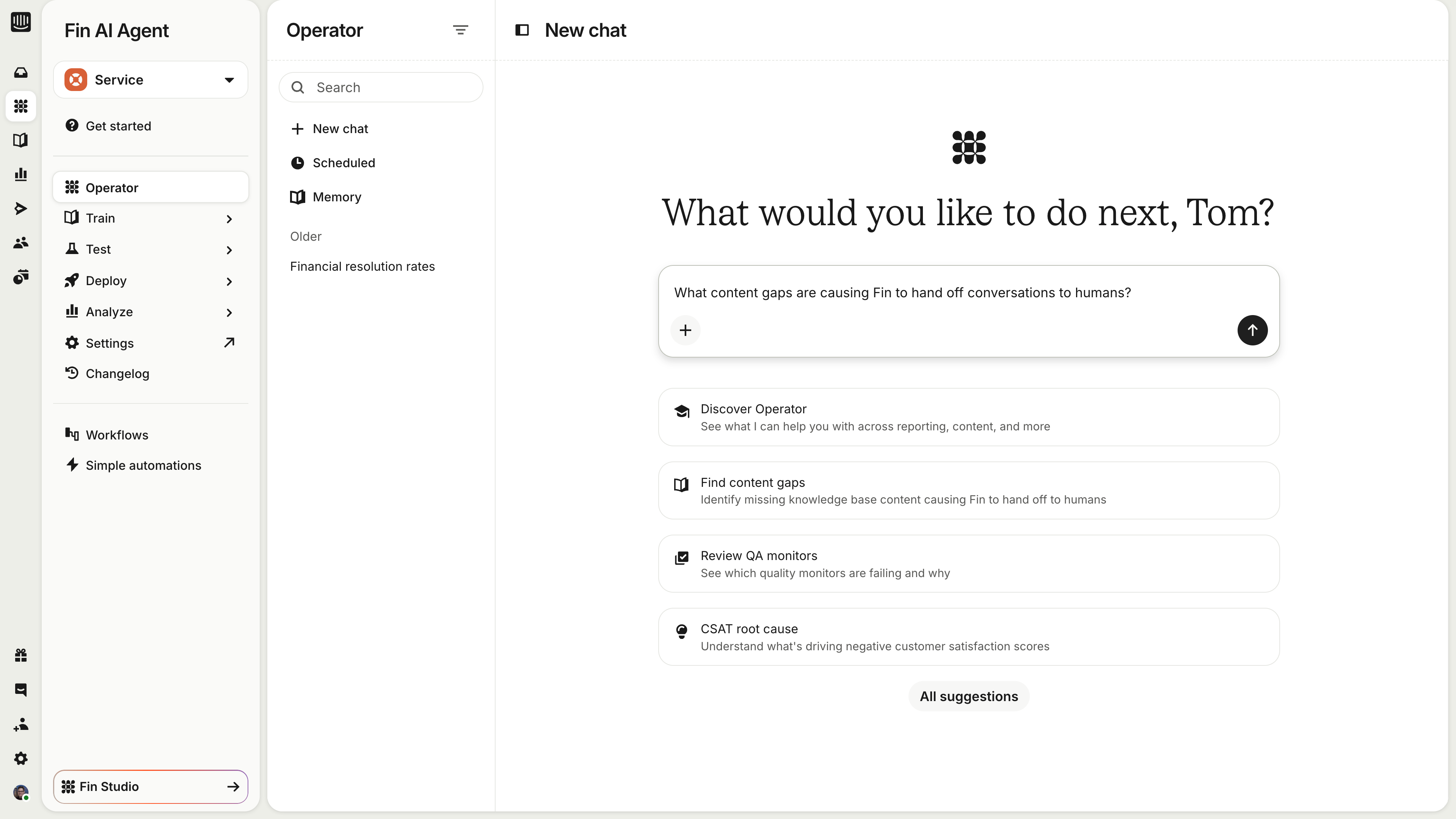
Fin Operator works across multiple skill areas in a single conversation. You can go from analyzing data to fixing a content gap without switching context. You’ll find it under Fin AI Agent > Operator in your workspace.


Skill area What Operator can do
Analysis and reporting Ask any question about your data or support operation and get structured answers with charts and breakdowns. Set any analysis to run on a recurring schedule, delivered automatically.
Content management Drafts new articles or updates to existing ones, matching your tone of voice and structure. Paste in a product update or policy change and Operator finds every affected article. Proactively flags underperforming, outdated, or contradictory content, and remembers your style guides across sessions.
Fin configuration and optimization Share a conversation and Operator debugs it, identifying what went wrong and why. Proposes Guidance changes, Procedure builds, and workflow updates, tests them against real historical conversations before shipping, and monitors them afterwards.
QA monitors Analyzes QA monitor results to show which conversations are failing and why. Breaks down pass/fail rates by monitor, evaluator, or topic, and suggests content or guidance fixes for failing patterns.
Bulk conversation actions Tag, reply, snooze, or close a whole set of conversations from a single plain-language request. Operator runs the job in the background, so you’re never blocked.

You can also upload product docs, call transcripts, or briefs directly into a thread to give Operator extra context for the content you want to create.


How Fin Operator makes changes

Every configuration change Fin Operator makes goes through a proposal. When you ask it to update an article, create a guidance rule, or modify a procedure, it doesn’t make the change directly. Instead:

  1. Operator proposes a change.
  2. You see a summary right in the chat: what’s being added, removed, or modified.
  3. You approve, edit, or reject the proposal.
  4. Only after your approval does the change go live.

Think of it like a pull request for your support setup. You always review before anything is merged.

Note: Fin Operator never publishes, deletes, or modifies content directly. Every change flows through this review step, so you stay in control.


Start with a real problem

The fastest way to see Operator’s value is to bring it something you’re actually working on. Use the framework from the video: ask with a clear goal, refine with follow-up questions, then act on the fix Operator drafts for you. The more context you give it, the better its proposals get.



What’s next?

You’ve seen what Fin Operator can do and how it keeps you in control, so what now?

Ready to go deeper?

Get the full picture of Operator’s capabilities and limitations, and find answers to common questions.

πŸ‘‰ How to use Fin Operator
πŸ‘‰ Fin Operator explained
πŸ‘‰ Fin Operator FAQs

About this course


Fin Operator is an agent for your customer operations that allows you to automate operational work, query support data, and build, test, and ship improvements to Fin in seconds. In this lesson, you’ll learn how a single conversation can take you from spotting a problem to shipping the fix.

Prerequisites

To put this lesson into practice, you will need:

  • Fin live in your workspace: Fin Operator draws on your knowledge, metrics, and conversation history, so it works best once Fin is handling real conversations.
  • Access to Fin Operator: You’ll need the Pro add-on and a US-hosted workspace while Operator is in early access.

Video transcript

Fin Operator is for so much more than reporting. It can surface issues, give suggestions, and make approved changes to improve any part of your support setup. Getting the most out of Fin is ongoing work. We're constantly training it, testing changes, deploying, and analyzing performance. And that's exactly what Operator was built for. Because Operator lives in your workspace, it knows your knowledge, your metrics, and how your team works. And through back and forth conversation, you can turn that context into real action. To get the most out of Operator, follow this simple framework. Ask, refine, act. First, come to operator with a goal in mind or a problem you want to solve and give it the context it needs. Next, keep asking questions and clarifying what you need, making sure operator stays on track. And last, get Operator to pin down where the issue actually is and how it can be fixed. It can then draft a solution ready for your review and approval. That's how Operator takes you from quick answers to a real problem solved. Let's look at an example. Let's say Fin escalated a conversation that we think it could have handled by itself. Let's ask operator about it and find out why it handed over. Operator scans the conversation, events, and reasoning, and generates a breakdown. Here's a summary, the step by step of what happened, a root cause, and recommendations. And we could keep asking questions to refine the query, but it looks like Fin has already pinned down the root cause as a knowledge gap. And here, it suggests what we can do about it. Just choose the action, in this case, create an article. Operator will draft one, which we can review and approve instantly. This is just one of the many ways Operator can help you take action and make improvements. Another way to use Operator is to treat it as a consultant, applying the same ask, refine, act framework. We could ask broader operational questions like, how do I get the rate of my billing escalations from thirty percent down to fifteen percent? We could even tell it about something we currently do manually that we'd like to automate. So if we're in the habit of reading through conversations one by one to gauge how customers feel about Fin, we could ask operator to do that for us and surface those insights whenever we need them. One last thing worth mentioning, Operator will never act on anything without your say so. It will always ask for approval first. So if you're new to Operator, start with the simple framework we covered today. Bring it a real problem, keep the conversation going, and ask it to help you find the next best action. That's where operator becomes most valuable, helping you spend less time figuring out where to look and more time improving the customer experience.


Note: Fin Operator is in early access with limited spots. It’s currently available to customers with the Pro add-on, on US-hosted workspaces only. To join the waitlist, go to Fin AI Agent > Operator and select Request early access. Not eligible yet? You can still register your interest, and we’ll notify you as access expands.


What Fin Operator can do

Fin Operator works across multiple skill areas in a single conversation. You can go from analyzing data to fixing a content gap without switching context. You’ll find it under Fin AI Agent > Operator in your workspace.


Skill area What Operator can do
Analysis and reporting Ask any question about your data or support operation and get structured answers with charts and breakdowns. Set any analysis to run on a recurring schedule, delivered automatically.
Content management Drafts new articles or updates to existing ones, matching your tone of voice and structure. Paste in a product update or policy change and Operator finds every affected article. Proactively flags underperforming, outdated, or contradictory content, and remembers your style guides across sessions.
Fin configuration and optimization Share a conversation and Operator debugs it, identifying what went wrong and why. Proposes Guidance changes, Procedure builds, and workflow updates, tests them against real historical conversations before shipping, and monitors them afterwards.
QA monitors Analyzes QA monitor results to show which conversations are failing and why. Breaks down pass/fail rates by monitor, evaluator, or topic, and suggests content or guidance fixes for failing patterns.
Bulk conversation actions Tag, reply, snooze, or close a whole set of conversations from a single plain-language request. Operator runs the job in the background, so you’re never blocked.

You can also upload product docs, call transcripts, or briefs directly into a thread to give Operator extra context for the content you want to create.


How Fin Operator makes changes

Every configuration change Fin Operator makes goes through a proposal. When you ask it to update an article, create a guidance rule, or modify a procedure, it doesn’t make the change directly. Instead:

  1. Operator proposes a change.
  2. You see a summary right in the chat: what’s being added, removed, or modified.
  3. You approve, edit, or reject the proposal.
  4. Only after your approval does the change go live.

Think of it like a pull request for your support setup. You always review before anything is merged.

Note: Fin Operator never publishes, deletes, or modifies content directly. Every change flows through this review step, so you stay in control.


Start with a real problem

The fastest way to see Operator’s value is to bring it something you’re actually working on. Use the framework from the video: ask with a clear goal, refine with follow-up questions, then act on the fix Operator drafts for you. The more context you give it, the better its proposals get.


What’s next?

You’ve seen what Fin Operator can do and how it keeps you in control, so what now?

Ready to go deeper?

Get the full picture of Operator’s capabilities and limitations, and find answers to common questions.

πŸ‘‰ How to use Fin Operator
πŸ‘‰ Fin Operator explained
πŸ‘‰ Fin Operator FAQs