Start free trial Webinars Certifications Catalog

How email differs from chat for Fin

Learn how email differs from chat and set Fin up for success on this channel.

rate limit

Code not recognized.

About this course


For most support teams, email is the second-biggest source of inbound volume. Fin can have a massive impact here, delivering excellent support to your customers and freeing up teammate capacity. But before you configure anything, it’s worth understanding the specific requirements of this channel, and what you should do differently.

Prerequisites

This lesson assumes Fin is already handling conversations for you elsewhere.

  • Fin deployed on chat: In most cases, it's better to already have Fin AI Agent live on your chat channel before expanding it to email. If you haven’t set Fin up yet, take the Launch Fin course to get started.
  • Email channel set up: To deploy Fin over email, you need to connect your email channel first.

Video transcript

On average, email accounts for around forty percent of inbound support volume, second only to live chat. So one of the most effective ways to expand the value you get from Fin is to deploy it over email. But email isn't just another channel. It's a different mode of communication with its own etiquette, expectations, and technical requirements. It's best to get these right from the very start. Let's take a look. Over chat, a customer usually sends a short question expecting to explain their issue through fast back and forth with the support agent, waiting in real time for each answer. Short, fast replies are natural and keep things moving, and the tone matches that energy, friendly and informal, mimicking how a face to face conversation plays out. So far, you've optimized Fin for communicating like this, but email works differently. Over email, a customer doesn't send a one line question. They usually write a comprehensive summary of their issue, often with more than one question packed into a single message. And not expecting a back and forth, They're expecting the support agent to send one thorough reply that addresses everything they've raised, along with any follow-up questions they'll need answered, so they can respond in one go. Tone is different, too. Email has its roots in written correspondence, so customers generally expect something more considered and more formal than a chat message with a proper greeting and sign off. And email is asynchronous. The customer doesn't expect an instant response from the support agent. And just as importantly, they don't want to feel rushed into giving one. And since email threads can easily be forwarded to third parties, email is a permanent record that carries a greater weight of responsibility for accuracy and professionalism. And any good support agent knows who to include in replies when there's more than one person in an email thread, especially when dealing with sensitive data. And finally, not every email we receive is worth replying to. Think of all the spam, junk, and promotional messages that litter your inbox. Any good support agent knows which messages to mark as spam and which need a reply. So here's the good news. Fin is built to handle all of this. It just means we need to configure this channel a little differently. The first is how Fin speaks, to give more thorough answers in a more formal tone. We also need to slow things down a little, adding wait times between messages and before closing out. And because the bar for accuracy is so much higher, we'll tell Fin exactly when to escalate to the team or loop them in for review. We'll also fine tune how Fin handles spam so it knows exactly when to reply and when not to. And there are a few more settings like which email address Fin should use, who it should include in replies, when to follow-up, and so on. None of this means that email is harder to get right. It's just different. The channel deserves its own configuration separate from the one you built for chat. In the next few lessons, we'll look closely at the guidance, the rules, the settings and the processes specific to email so you can automate this huge slice of your inbound volume.


At a glance: how email differs from chat

  Chat Email
Length Short, single questions A full summary, often with several questions bundled together
Depth A quick answer is enough Needs one thorough reply that addresses everything raised
Tone Friendly and informal Considered and formal, with a proper greeting and sign-off
Timing Real-time, back-and-forth Asynchronous: customers don’t expect an instant reply, and don’t want to feel rushed into one
Permanence Rarely referenced again A permanent record that can be forwarded, sometimes to several people at once


Expect a lower resolution rate on email

When setting your expectations for Fin’s performance over email, remember that, in practice, results can be around 10% lower than for chat.

There are a number of reasons for this, inherent to this channel:

  • Each email carries more questions: A single message can raise several questions at once, so a resolved reply has to close all of them, not just the easiest one. That’s a higher bar than a one-line chat answer.
  • Accuracy matters more than speed: Because an email thread is a permanent record with a higher emphasis on accuracy, Fin is deliberately configured to escalate or loop in your team whenever the stakes are higher, such as sensitive data, ambiguous requests, or anything that needs a second look.
  • Some emails shouldn’t get a reply at all: Non-support messages that make it through your initial spam filters count as inbound volume. Fin filtering these out correctly won’t show up as a resolution, even though it’s doing exactly the right thing.
  • Email moves slower: Built-in wait times mean fewer conversations close within a short window. That’s Fin matching the pace customers actually expect from email, not a delay you need to fix.

Put together, a lower resolution rate on email doesn’t mean Fin is underperforming. It means Fin is applying the right amount of caution to a channel where getting it wrong costs more, while still automating a huge slice of volume that used to need a human from the very first read.


Give Fin an email address for replies

For Fin to reply to customers, it needs an address to reply from.

Go to Settings > Workspace > Brands and click on your relevant brand. Scroll to the Fin email address section and select the verified email address you want Fin to use for replies for that brand.
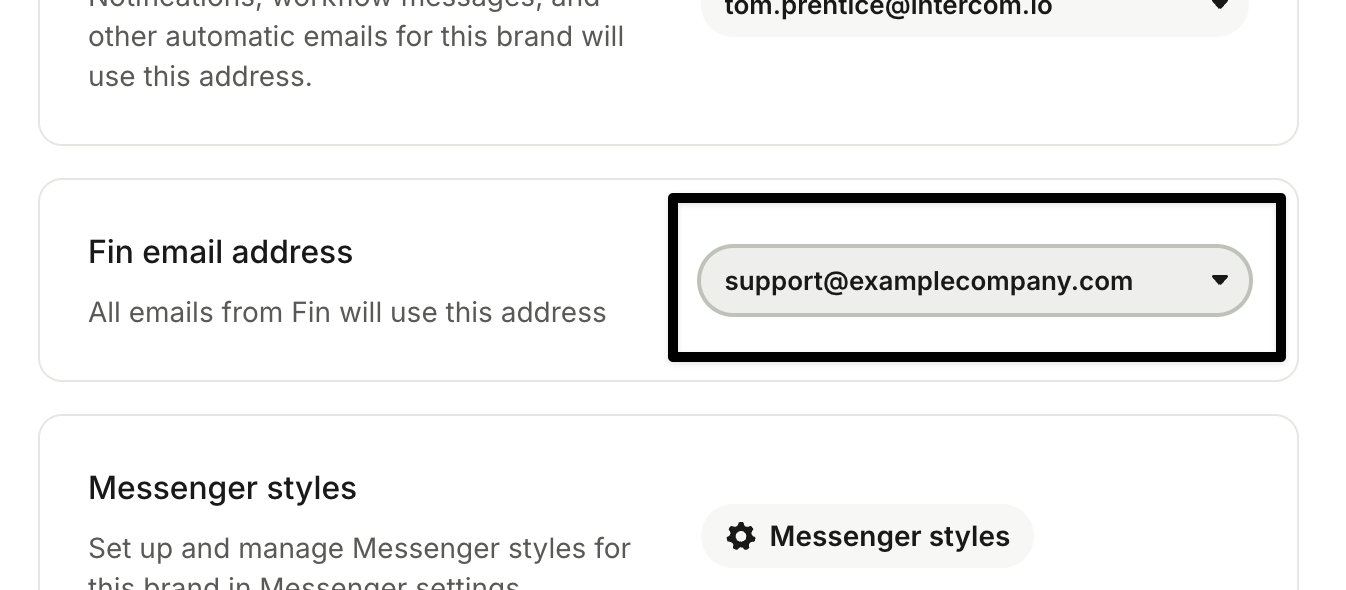
Selecting a Fin email reply address in Brand settings

See Deploy Fin AI Agent over email for more details.


Haven’t connected your email channel yet?

If your email support channel isn’t set up, you’ll need to connect it first before Fin can reply to your customers.

See Connect your email support channel for the setup steps.



What’s next?

You now know what makes email a different challenge for Fin, and you’ve got a reply address configured, so what now?

Ready to go deeper?

This lesson is part of the full Expand Fin to Email course, covering training, deployment, and post-launch monitoring.
πŸ‘‰ Take the full course


About this course


For most support teams, email is the second-biggest source of inbound volume. Fin can have a massive impact here, delivering excellent support to your customers and freeing up teammate capacity. But before you configure anything, it’s worth understanding the specific requirements of this channel, and what you should do differently.

Prerequisites

This lesson assumes Fin is already handling conversations for you elsewhere.

  • Fin deployed on chat: In most cases, it's better to already have Fin AI Agent live on your chat channel before expanding it to email. If you haven’t set Fin up yet, take the Launch Fin course to get started.
  • Email channel set up: To deploy Fin over email, you need to connect your email channel first.

Video transcript

On average, email accounts for around forty percent of inbound support volume, second only to live chat. So one of the most effective ways to expand the value you get from Fin is to deploy it over email. But email isn't just another channel. It's a different mode of communication with its own etiquette, expectations, and technical requirements. It's best to get these right from the very start. Let's take a look. Over chat, a customer usually sends a short question expecting to explain their issue through fast back and forth with the support agent, waiting in real time for each answer. Short, fast replies are natural and keep things moving, and the tone matches that energy, friendly and informal, mimicking how a face to face conversation plays out. So far, you've optimized Fin for communicating like this, but email works differently. Over email, a customer doesn't send a one line question. They usually write a comprehensive summary of their issue, often with more than one question packed into a single message. And not expecting a back and forth, They're expecting the support agent to send one thorough reply that addresses everything they've raised, along with any follow-up questions they'll need answered, so they can respond in one go. Tone is different, too. Email has its roots in written correspondence, so customers generally expect something more considered and more formal than a chat message with a proper greeting and sign off. And email is asynchronous. The customer doesn't expect an instant response from the support agent. And just as importantly, they don't want to feel rushed into giving one. And since email threads can easily be forwarded to third parties, email is a permanent record that carries a greater weight of responsibility for accuracy and professionalism. And any good support agent knows who to include in replies when there's more than one person in an email thread, especially when dealing with sensitive data. And finally, not every email we receive is worth replying to. Think of all the spam, junk, and promotional messages that litter your inbox. Any good support agent knows which messages to mark as spam and which need a reply. So here's the good news. Fin is built to handle all of this. It just means we need to configure this channel a little differently. The first is how Fin speaks, to give more thorough answers in a more formal tone. We also need to slow things down a little, adding wait times between messages and before closing out. And because the bar for accuracy is so much higher, we'll tell Fin exactly when to escalate to the team or loop them in for review. We'll also fine tune how Fin handles spam so it knows exactly when to reply and when not to. And there are a few more settings like which email address Fin should use, who it should include in replies, when to follow-up, and so on. None of this means that email is harder to get right. It's just different. The channel deserves its own configuration separate from the one you built for chat. In the next few lessons, we'll look closely at the guidance, the rules, the settings and the processes specific to email so you can automate this huge slice of your inbound volume.


At a glance: how email differs from chat

  Chat Email
Length Short, single questions A full summary, often with several questions bundled together
Depth A quick answer is enough Needs one thorough reply that addresses everything raised
Tone Friendly and informal Considered and formal, with a proper greeting and sign-off
Timing Real-time, back-and-forth Asynchronous: customers don’t expect an instant reply, and don’t want to feel rushed into one
Permanence Rarely referenced again A permanent record that can be forwarded, sometimes to several people at once


Expect a lower resolution rate on email

When setting your expectations for Fin’s performance over email, remember that, in practice, results can be around 10% lower than for chat.

There are a number of reasons for this, inherent to this channel:

  • Each email carries more questions: A single message can raise several questions at once, so a resolved reply has to close all of them, not just the easiest one. That’s a higher bar than a one-line chat answer.
  • Accuracy matters more than speed: Because an email thread is a permanent record with a higher emphasis on accuracy, Fin is deliberately configured to escalate or loop in your team whenever the stakes are higher, such as sensitive data, ambiguous requests, or anything that needs a second look.
  • Some emails shouldn’t get a reply at all: Non-support messages that make it through your initial spam filters count as inbound volume. Fin filtering these out correctly won’t show up as a resolution, even though it’s doing exactly the right thing.
  • Email moves slower: Built-in wait times mean fewer conversations close within a short window. That’s Fin matching the pace customers actually expect from email, not a delay you need to fix.

Put together, a lower resolution rate on email doesn’t mean Fin is underperforming. It means Fin is applying the right amount of caution to a channel where getting it wrong costs more, while still automating a huge slice of volume that used to need a human from the very first read.


Give Fin an email address for replies

For Fin to reply to customers, it needs an address to reply from.

Go to Settings > Workspace > Brands and click on your relevant brand. Scroll to the Fin email address section and select the verified email address you want Fin to use for replies for that brand.

Selecting a Fin email reply address in Brand settings

See Deploy Fin AI Agent over email for more details.


Haven’t connected your email channel yet?

If your email support channel isn’t set up, you’ll need to connect it first before Fin can reply to your customers.

See Connect your email support channel for the setup steps.


What’s next?

You now know what makes email a different challenge for Fin, and you’ve got a reply address configured, so what now?

Ready to go deeper?

This lesson is part of the full Expand Fin to Email course, covering training, deployment, and post-launch monitoring.
πŸ‘‰ Take the full course