
Start free trial Webinars Certifications Catalog

Manage Fin Guidance at scale

Structure and audit Fin's Guidance as your deployment grows, so instructions don't conflict.

rate limit

Code not recognized.

About this course


When you first set up Guidance, you wrote targeted instructions for a focused, controlled set of topics. But as that setup grows, more topics, more channels, and more audiences, Guidance that once sat neatly in place starts interacting with itself in ways you didn’t plan for. This lesson isn’t about starting over, it’s about being more intentional with what you already have.

Prerequisites

Before you work through this lesson, it helps to have the following in place:

  • Fin is live: You already have Fin deployed and automating some of your informational queries. This lesson is about scaling an existing deployment, not standing one up.
  • Familiarity with Fin’s core components: If you’re newer to Fin, start with the Launch Fin course, which covers launching Fin over chat in an initial pilot.
  • Guidance already set up: You’ve written Guidance for a focused set of topics and now want to manage it as your deployment grows.

Video transcript

Setting up guidance when you first launch Fin and managing it as you scale? Two completely different jobs. When you first started, you had a narrow scope. One channel, maybe a focused set of topics. But as you let Fin handle more topics and channels and audiences, it needs to be handled more intentionally. So to avoid the pitfalls as you manage guidance at scale, let's go through the three most common ones and how to address them. The first instinct when something goes wrong is to write another instruction. But managing guidance at scale isn't about adding more. It's about being more deliberate. So before Fin generates a reply, it scans the conversation context and your help content and applies guidance that's relevant. If multiple instructions match, Fin applies them all at once. So the more guidance you add here, there's more chance they'll conflict or cause behaviour you didn't intend. So how do we fix this? Keep each instruction focused on one purpose, whether that's tone, topic, audience or escalation behaviour. Not all four in one entry. Regularly review your guidance and retire anything that no longer earns its place there. Next, any guidance you add will apply everywhere by default, unless you scope it correctly. Guidance you've written when you've only had Fin on live chat that says keep responses short and direct will apply to Fin's responses if you set it live on email, where customers expect something a little bit more thorough. So for each piece of guidance, ask yourself: should this stay global, or should it be scoped to a specific channel, audience, or situation? If you don't want it everywhere, use audience targeting, channel filters, and be specific in natural language about when you want this to apply. It's okay to have a global setting, just make sure it's really what you want. And finally, guidance is one of the layers to train Fin, and it has a specific job. Mixing these up is one of the most common reasons why Fin might behave unexpectedly. Content is what Fin knows, the actual answers. If one of them is wrong or missing, no piece of guidance will ever fix that. Guidance shapes how Fin behaves, its communication style, policy and how it knows when to escalate. And if the outcome is still not what you want, chances are you'll need a procedure for step by step logic. This is how people actually progress with Fin. They start with content, add guidance to change behaviour, and eventually create multi step procedures to handle more complex queries. We've got more on how to diagnose which layer a problem belongs to in the lesson below. So how do you know any of this will work? Before a change goes live, we can test it in preview. Check that Fin behaves differently and that the change is doing what you intended. After it's deployed, use the event log to see exactly what fired and when. And that's how you confirmed it worked and how you catch something that's quietly competing where it shouldn't be. Oh, and one last thing. At scale, you'll need someone to own guidance. If everyone's responsible, no one actually does it. So before anything else, decide who that is, so you can ensure that Fin's behaviour remains consistent as you expand.


Signals that something’s off with your Guidance

When Fin’s behavior isn’t working as expected, look at what’s already there before instinctively adding more instructions.

Here are some patterns to watch for in Fin conversations that suggest a Guidance problem:

  • Fin’s tone or voice feels off: too formal, too casual, or the wrong register for your brand.
    Add or update a communication style Guidance entry. Be specific. Give Fin an example of the tone you want, not just a label like “friendly.” Check for contradicting tone instructions that might be canceling each other out.
  • Responses are the wrong length or format for the channel: too brief for email, too long for chat, or structured in a way that doesn’t match the context.
    Add length or format Guidance scoped to the specific channel. Check your answer length setting first. Guidance should only step in when you need stricter control.
  • Fin isn’t asking clarifying questions when it should: jumping straight to an answer on nuanced questions that need more context first.
    Add clarification Guidance using if/when/then conditions. For example: “If a customer asks about X, first ask which plan they’re on before responding.” Keep one entry per scenario.
  • Fin is escalating when it shouldn’t, or holding back when it should.
    Review your escalation Guidance and rules in Fin AI Agent → Train → Escalation. Look for conflicting rules. One rule empowering Fin to resolve an issue while another requires escalation for the same trigger will cause unpredictable behavior.
  • Fin is inconsistent across similar conversations on the same topic.
    Audit your Guidance for overlapping or contradictory instructions. Two rules addressing the same scenario can compete, so consolidate them into one focused entry.
  • Fin is applying a behavior in conversations where it shouldn’t.
    Check whether the Guidance needs to be scoped. For example, if you want Fin to handle sensitive situations like refunds or cancellations with more care, specify that in the Guidance. Otherwise it will apply its usual tone everywhere. Use audience targeting or channel filters to narrow when a rule applies.

Compare that with content signals, which look different:

  • The answer is factually wrong or outdated Update or add new content.
  • Fin says it doesn’t know something that should be in your help content Clarify how the information is written.
  • Fin tells the customer to “contact support” when a perfectly good answer exists Give Fin communication Guidance not to repeat that if the customer is already contacting support.

If you’re seeing the first set of patterns, the problem is almost certainly in your Guidance. But what if you’ve reviewed and tested your updates and the issue still isn’t fixed? That’s when other training layers might be affecting Fin’s responses.

Diagnosing the layer where the problem lies

Guidance is one of several training layers used to control or influence how Fin handles conversations. Being able to identify the correct layer matters, because using one layer to fix a problem that belongs in another only masks the underlying issue.
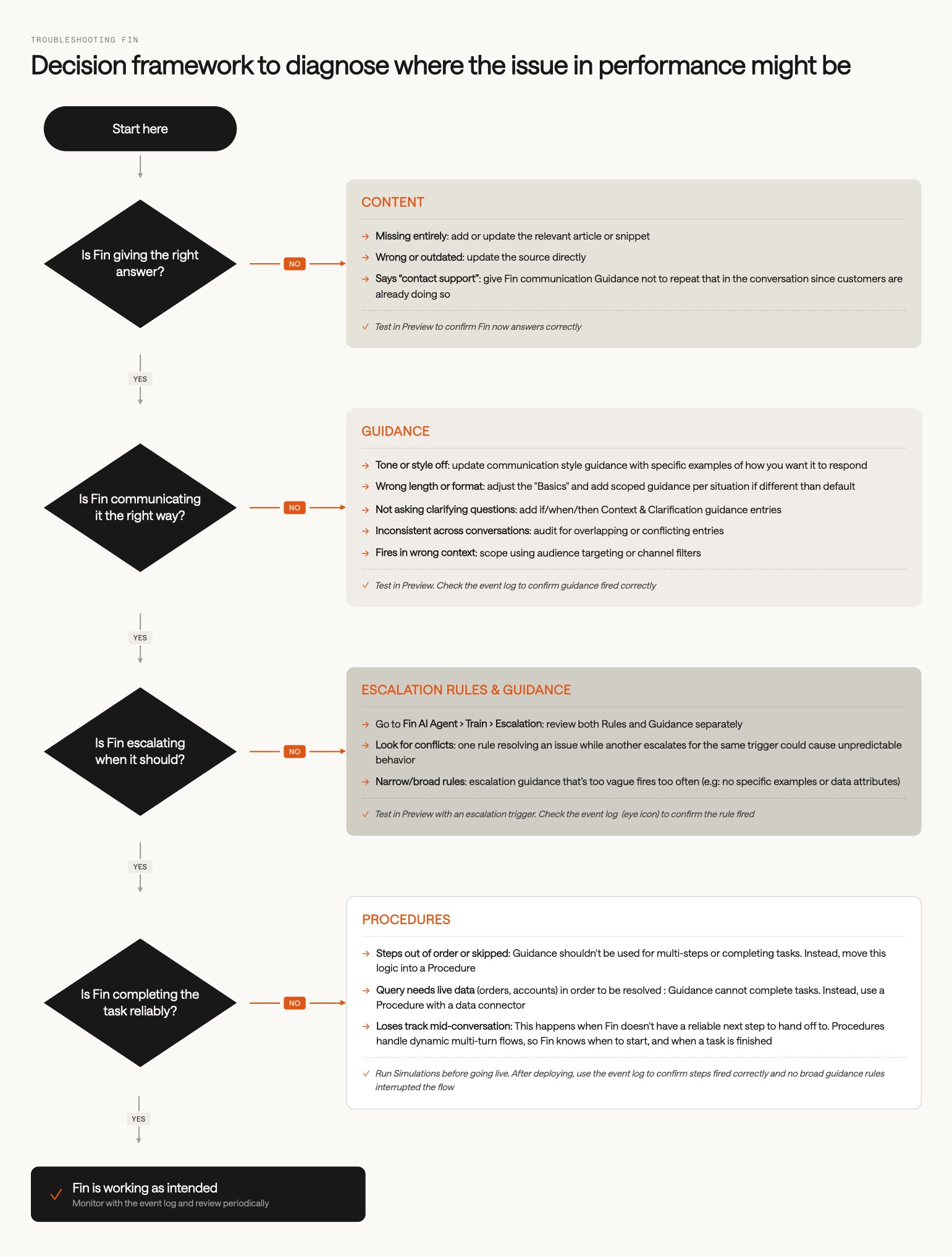
Fin decision framework

If you want to go deeper on writing Guidance that actually works, keep our Guidance best practices article handy as a reference whenever you’re adding or updating Guidance.



What’s next?

You’ve gone from thinking about Guidance as a list of instructions to managing it as a system, spotting a Guidance issue in a conversation before it becomes a habit, and working out whether a problem belongs in content, Guidance, or procedures. So what now?

Ready to go deeper?

Managing Guidance at scale is one part of scaling an existing Fin deployment. The full course covers prioritizing your roadmap, expanding to new channels and audiences, monitoring quality, and sustaining performance over time.

About this course


When you first set up Guidance, you wrote targeted instructions for a focused, controlled set of topics. But as that setup grows, more topics, more channels, and more audiences, Guidance that once sat neatly in place starts interacting with itself in ways you didn’t plan for. This lesson isn’t about starting over, it’s about being more intentional with what you already have.

Prerequisites

Before you work through this lesson, it helps to have the following in place:

  • Fin is live: You already have Fin deployed and automating some of your informational queries. This lesson is about scaling an existing deployment, not standing one up.
  • Familiarity with Fin’s core components: If you’re newer to Fin, start with the Launch Fin course, which covers launching Fin over chat in an initial pilot.
  • Guidance already set up: You’ve written Guidance for a focused set of topics and now want to manage it as your deployment grows.

Video transcript

Setting up guidance when you first launch Fin and managing it as you scale? Two completely different jobs. When you first started, you had a narrow scope. One channel, maybe a focused set of topics. But as you let Fin handle more topics and channels and audiences, it needs to be handled more intentionally. So to avoid the pitfalls as you manage guidance at scale, let's go through the three most common ones and how to address them. The first instinct when something goes wrong is to write another instruction. But managing guidance at scale isn't about adding more. It's about being more deliberate. So before Fin generates a reply, it scans the conversation context and your help content and applies guidance that's relevant. If multiple instructions match, Fin applies them all at once. So the more guidance you add here, there's more chance they'll conflict or cause behaviour you didn't intend. So how do we fix this? Keep each instruction focused on one purpose, whether that's tone, topic, audience or escalation behaviour. Not all four in one entry. Regularly review your guidance and retire anything that no longer earns its place there. Next, any guidance you add will apply everywhere by default, unless you scope it correctly. Guidance you've written when you've only had Fin on live chat that says keep responses short and direct will apply to Fin's responses if you set it live on email, where customers expect something a little bit more thorough. So for each piece of guidance, ask yourself: should this stay global, or should it be scoped to a specific channel, audience, or situation? If you don't want it everywhere, use audience targeting, channel filters, and be specific in natural language about when you want this to apply. It's okay to have a global setting, just make sure it's really what you want. And finally, guidance is one of the layers to train Fin, and it has a specific job. Mixing these up is one of the most common reasons why Fin might behave unexpectedly. Content is what Fin knows, the actual answers. If one of them is wrong or missing, no piece of guidance will ever fix that. Guidance shapes how Fin behaves, its communication style, policy and how it knows when to escalate. And if the outcome is still not what you want, chances are you'll need a procedure for step by step logic. This is how people actually progress with Fin. They start with content, add guidance to change behaviour, and eventually create multi step procedures to handle more complex queries. We've got more on how to diagnose which layer a problem belongs to in the lesson below. So how do you know any of this will work? Before a change goes live, we can test it in preview. Check that Fin behaves differently and that the change is doing what you intended. After it's deployed, use the event log to see exactly what fired and when. And that's how you confirmed it worked and how you catch something that's quietly competing where it shouldn't be. Oh, and one last thing. At scale, you'll need someone to own guidance. If everyone's responsible, no one actually does it. So before anything else, decide who that is, so you can ensure that Fin's behaviour remains consistent as you expand.


Signals that something’s off with your Guidance

When Fin’s behavior isn’t working as expected, look at what’s already there before instinctively adding more instructions.

Here are some patterns to watch for in Fin conversations that suggest a Guidance problem:

  • Fin’s tone or voice feels off: too formal, too casual, or the wrong register for your brand.
    Add or update a communication style Guidance entry. Be specific. Give Fin an example of the tone you want, not just a label like “friendly.” Check for contradicting tone instructions that might be canceling each other out.
  • Responses are the wrong length or format for the channel: too brief for email, too long for chat, or structured in a way that doesn’t match the context.
    Add length or format Guidance scoped to the specific channel. Check your answer length setting first. Guidance should only step in when you need stricter control.
  • Fin isn’t asking clarifying questions when it should: jumping straight to an answer on nuanced questions that need more context first.
    Add clarification Guidance using if/when/then conditions. For example: “If a customer asks about X, first ask which plan they’re on before responding.” Keep one entry per scenario.
  • Fin is escalating when it shouldn’t, or holding back when it should.
    Review your escalation Guidance and rules in Fin AI Agent → Train → Escalation. Look for conflicting rules. One rule empowering Fin to resolve an issue while another requires escalation for the same trigger will cause unpredictable behavior.
  • Fin is inconsistent across similar conversations on the same topic.
    Audit your Guidance for overlapping or contradictory instructions. Two rules addressing the same scenario can compete, so consolidate them into one focused entry.
  • Fin is applying a behavior in conversations where it shouldn’t.
    Check whether the Guidance needs to be scoped. For example, if you want Fin to handle sensitive situations like refunds or cancellations with more care, specify that in the Guidance. Otherwise it will apply its usual tone everywhere. Use audience targeting or channel filters to narrow when a rule applies.

Compare that with content signals, which look different:

  • The answer is factually wrong or outdated Update or add new content.
  • Fin says it doesn’t know something that should be in your help content Clarify how the information is written.
  • Fin tells the customer to “contact support” when a perfectly good answer exists Give Fin communication Guidance not to repeat that if the customer is already contacting support.

If you’re seeing the first set of patterns, the problem is almost certainly in your Guidance. But what if you’ve reviewed and tested your updates and the issue still isn’t fixed? That’s when other training layers might be affecting Fin’s responses.

Diagnosing the layer where the problem lies

Guidance is one of several training layers used to control or influence how Fin handles conversations. Being able to identify the correct layer matters, because using one layer to fix a problem that belongs in another only masks the underlying issue.

Fin decision framework

If you want to go deeper on writing Guidance that actually works, keep our Guidance best practices article handy as a reference whenever you’re adding or updating Guidance.


What’s next?

You’ve gone from thinking about Guidance as a list of instructions to managing it as a system, spotting a Guidance issue in a conversation before it becomes a habit, and working out whether a problem belongs in content, Guidance, or procedures. So what now?

Ready to go deeper?

Managing Guidance at scale is one part of scaling an existing Fin deployment. The full course covers prioritizing your roadmap, expanding to new channels and audiences, monitoring quality, and sustaining performance over time.