
Start free trial Webinars Certifications Catalog

Map your Fin Attributes

Set up Fin Attributes to automatically classify conversations and power smarter routing and reporting.

rate limit

Code not recognized.

About this course


Fin Attributes automatically classify every conversation Fin handles, capturing structured data like issue type, sentiment, and urgency in real time. With this data applied instantly, you can route to the right team, trigger the right actions, and unlock accurate reporting without any manual effort.

But before you create your first attribute, you need to decide what to track. The attributes you choose should reflect your business, your customers’ needs, and the experience you want to deliver.

This lesson is part of the Launch Fin course.

Prerequisites

Before setting up Fin Attributes, make sure you have the following in place:

  • Content added to Fin: You should have content sources connected so Fin can answer customer questions.
  • Guidance added to Fin: You should have tone, behavior, and escalation guidance configured.

Learn how to set these up in the Launch Fin course.


Video transcript

Gone are the days of manual tagging to track what's happening in your inbox. Fin Attributes handle all of that automatically, delivering the powerful insights and automation essential for Fin-first deployment. They classify every conversation Fin handles into structured data, like issue type, urgency level, customer sentiment, whatever you need to know. That means we get reliable insights into what customers are asking, how they're feeling, and more. Plus, how well Fin is performing in each area, so we know where Fin is succeeding and where we need to focus improvements. Fin Attributes also give you the control you need to drive powerful automation, like escalating sensitive issues instantly and routing straight to the right team, prioritizing urgent queries, and even filtering out unwanted messages before they can slow our teammates down. And they're so easy to set up. Under Train, select Attributes, and New. Add a title in the description, then describe each value in natural language and when it should or shouldn't apply. And let Fin handle the rest. Look below this video for examples to use as inspiration. The key thing to remember though, is that you need to define the attributes you want to track. They should reflect your business, your customers' needs, and the experience that you want to deliver. Fin Attributes power smarter support at scale, giving you clear visibility into your conversations, driving efficiency, and delivering a smoother experience for your customers.


How to create a Fin Attribute

Here are three steps to creating Fin Attributes:

  1. Decide: Start by deciding what information you want to detect in every Fin conversation. Common examples include issue type, sentiment, urgency, or spam.
  2. Create: Go to Fin AI Agent → Train → Attributes and click + New. Give your attribute a clear name and description, then define the possible values it can have. Fin relies on these descriptions to choose the correct value, so make them distinct. Specify when each value should and shouldn’t apply.
  3. Preview and enable: Use the preview tool to test accuracy. Refine your value descriptions as needed, then enable the attribute for live conversations.

Once enabled, you can use Fin Attributes in reporting, workflows, and escalation rules. Learn more about creating Fin Attributes on the Help Center.


Common Fin Attribute examples

Use these as inspiration when deciding what to track. Most teams start with two to four attributes and expand over time.

Attribute Example values What it helps you do
Issue Type Billing, Technical, Account Access, Shipping, Returns, Other Route conversations to the right team and understand what customers ask about most. This is the most common starting attribute.
Sentiment Positive, Neutral, Negative Flag frustrated customers for priority handling. Combine with other attributes in reports to spot patterns, like Billing + Negative signalling churn risk.
Urgency High, Medium, Low Prioritize time-sensitive issues and escalate critical problems instantly. Urgency is independent of sentiment: a calm message can still be urgent.
Request Type Question, Bug Report, Feature Request, Task Request, Other Distinguish between informational queries and actionable requests. Route feature requests to your product team or a Jira integration.
Spam Spam, Legitimate Filter out auto-replies, newsletters, and junk messages before they reach your team. Keeps your inbox and reports clean.
Product Area (Your product areas) Break down support volume by product to identify which areas drive the most questions. Useful for routing to specialist teams.
Tip: Write detailed descriptions for each value, including keywords, example customer phrases, and what should not be included. The more specific your descriptions, the more accurate Fin’s classification will be.


Conditional attributes

For more advanced setups, you can create attributes that only activate when another attribute matches a specific value.
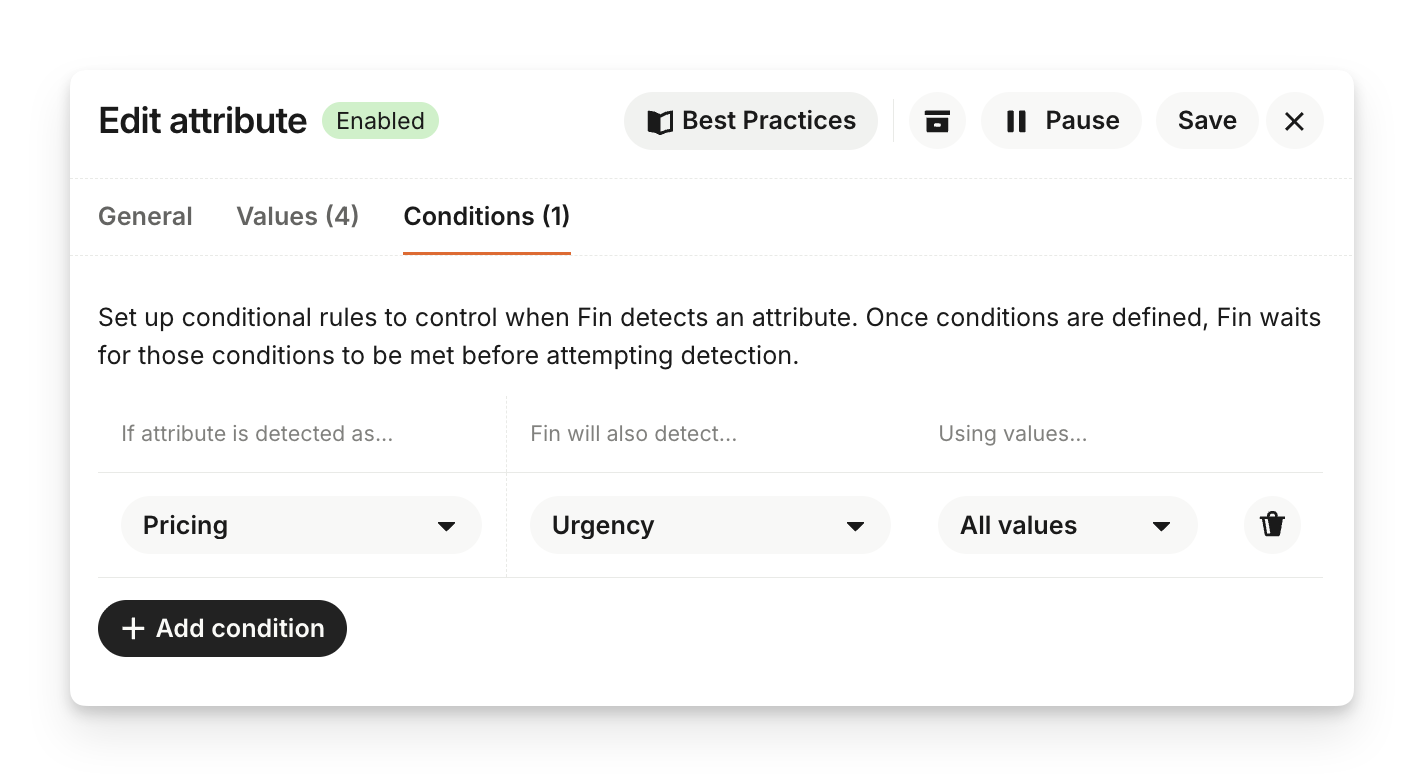
For example:

  • If Issue Type = Refund Request, also detect Refund Reason (Product defect, Overcharged, Wrong item, Changed mind)
  • If Issue Type = Cancellation, also detect Cancellation Reason (Not happy with service, Moving to competitor, Reducing expenses)

This keeps classification focused and avoids cluttering conversations where those details aren’t relevant.


If you only remember one thing

Set up Fin Attributes as early as possible. The sooner they’re in place, the sooner you’ll unlock powerful insights and automation that drive improvement, efficiency, and a great customer experience.

They don’t need to be perfect from day one. You can refine and expand them over time as new opportunities emerge.



What’s next?

You now know how to map and create Fin Attributes to classify conversations automatically, so what now? 

Take the next step...

Next, learn how to put your attributes to work in workflows, reporting, and escalation rules. Everything you need is in the Launch Fin course.
πŸ‘‰ Take the Launch Fin course

About this course


Fin Attributes automatically classify every conversation Fin handles, capturing structured data like issue type, sentiment, and urgency in real time. With this data applied instantly, you can route to the right team, trigger the right actions, and unlock accurate reporting without any manual effort.

But before you create your first attribute, you need to decide what to track. The attributes you choose should reflect your business, your customers’ needs, and the experience you want to deliver.

This lesson is part of the Launch Fin course.

Prerequisites

Before setting up Fin Attributes, make sure you have the following in place:

  • Content added to Fin: You should have content sources connected so Fin can answer customer questions.
  • Guidance added to Fin: You should have tone, behavior, and escalation guidance configured.

Learn how to set these up in the Launch Fin course.


Video transcript

Gone are the days of manual tagging to track what's happening in your inbox. Fin Attributes handle all of that automatically, delivering the powerful insights and automation essential for Fin-first deployment. They classify every conversation Fin handles into structured data, like issue type, urgency level, customer sentiment, whatever you need to know. That means we get reliable insights into what customers are asking, how they're feeling, and more. Plus, how well Fin is performing in each area, so we know where Fin is succeeding and where we need to focus improvements. Fin Attributes also give you the control you need to drive powerful automation, like escalating sensitive issues instantly and routing straight to the right team, prioritizing urgent queries, and even filtering out unwanted messages before they can slow our teammates down. And they're so easy to set up. Under Train, select Attributes, and New. Add a title in the description, then describe each value in natural language and when it should or shouldn't apply. And let Fin handle the rest. Look below this video for examples to use as inspiration. The key thing to remember though, is that you need to define the attributes you want to track. They should reflect your business, your customers' needs, and the experience that you want to deliver. Fin Attributes power smarter support at scale, giving you clear visibility into your conversations, driving efficiency, and delivering a smoother experience for your customers.


How to create a Fin Attribute

Here are three steps to creating Fin Attributes:

  1. Decide: Start by deciding what information you want to detect in every Fin conversation. Common examples include issue type, sentiment, urgency, or spam.
  2. Create: Go to Fin AI Agent → Train → Attributes and click + New. Give your attribute a clear name and description, then define the possible values it can have. Fin relies on these descriptions to choose the correct value, so make them distinct. Specify when each value should and shouldn’t apply.
  3. Preview and enable: Use the preview tool to test accuracy. Refine your value descriptions as needed, then enable the attribute for live conversations.

Once enabled, you can use Fin Attributes in reporting, workflows, and escalation rules. Learn more about creating Fin Attributes on the Help Center.


Common Fin Attribute examples

Use these as inspiration when deciding what to track. Most teams start with two to four attributes and expand over time.

Attribute Example values What it helps you do
Issue Type Billing, Technical, Account Access, Shipping, Returns, Other Route conversations to the right team and understand what customers ask about most. This is the most common starting attribute.
Sentiment Positive, Neutral, Negative Flag frustrated customers for priority handling. Combine with other attributes in reports to spot patterns, like Billing + Negative signalling churn risk.
Urgency High, Medium, Low Prioritize time-sensitive issues and escalate critical problems instantly. Urgency is independent of sentiment: a calm message can still be urgent.
Request Type Question, Bug Report, Feature Request, Task Request, Other Distinguish between informational queries and actionable requests. Route feature requests to your product team or a Jira integration.
Spam Spam, Legitimate Filter out auto-replies, newsletters, and junk messages before they reach your team. Keeps your inbox and reports clean.
Product Area (Your product areas) Break down support volume by product to identify which areas drive the most questions. Useful for routing to specialist teams.
Tip: Write detailed descriptions for each value, including keywords, example customer phrases, and what should not be included. The more specific your descriptions, the more accurate Fin’s classification will be.


Conditional attributes

For more advanced setups, you can create attributes that only activate when another attribute matches a specific value.

For example:

  • If Issue Type = Refund Request, also detect Refund Reason (Product defect, Overcharged, Wrong item, Changed mind)
  • If Issue Type = Cancellation, also detect Cancellation Reason (Not happy with service, Moving to competitor, Reducing expenses)

This keeps classification focused and avoids cluttering conversations where those details aren’t relevant.


If you only remember one thing

Set up Fin Attributes as early as possible. The sooner they’re in place, the sooner you’ll unlock powerful insights and automation that drive improvement, efficiency, and a great customer experience.

They don’t need to be perfect from day one. You can refine and expand them over time as new opportunities emerge.


What’s next?

You now know how to map and create Fin Attributes to classify conversations automatically, so what now? 

Take the next step...

Next, learn how to put your attributes to work in workflows, reporting, and escalation rules. Everything you need is in the Launch Fin course.
πŸ‘‰ Take the Launch Fin course