
Start free trial Webinars Certifications Catalog

Train Fin over email

Learn how to configure guidance and other features so Fin behaves effectively over email.

rate limit

Code not recognized.

About this course


On any channel, Fin draws on the same help content to answer questions. What changes is how it should behave to fit that channel’s norms, and shaping that behavior is the job of Guidance. Here’s what needs to be adjusted for email.

Prerequisites

Before training Fin for email, make sure you're ready to go.

  • Fin deployed on chat: In most cases, it's better to already have Fin AI Agent live on your chat channel before expanding it to email. If you haven’t set Fin up yet, take the Launch Fin course to get started.
  • Email channel set up: To deploy Fin over email, you need to connect you email channel first.

Video transcript

Over email, Fin needs to know how to speak, which messages to ignore, and when a query needs the attention of a teammate. Let's head over to Train for a closer look. Out of the box, Fin will already adjust its style for email, but we can add guidance to reinforce this behavior and build on it. We can make sure Fin addresses every question a customer raised, not just the first one. Set exactly how Fin should sign off its replies and other details on how to follow our preferred style. Check below this video for a ready made example that you can copy, paste, and edit to suit your needs. We'll target only the email channel, This will override any of the defaults that we set previously when we were optimizing just for chat. While we're setting Communication style guidance, let's add this template too. If your help content ever advises customers to reach out to support, you'll want to make sure Fin doesn't echo that advice in an email reply, since that's exactly what the customer is already doing. There's a slightly higher risk of this over email because of the more thorough answers Fin provides on this channel. These are the touches that take Fin from writing a good email to writing one that sounds like it came from your team. Our team already knows not to waste time replying to newsletters, auto replies, promotions, and outright junk, and we want the same for Fin. We can add Spam guidance here targeted at just the email channel and describe in plain language what to mark as spam so that Fin only responds to genuine queries. If some unwanted mail still slips through and Fin tries to respond, we can fine tune our Spam guidance to catch it in future. It's also important to check Fin's Spam folder regularly for false positives or other non-support messages that we do want our teammates to see, like security reports or other important notices. We'll mark these as genuine and add the sender to an escalation rule so they go straight to the team instead. You can also tell Fin when to loop in a teammate for help without handing the whole conversation over. This is called Human in the loop, where you set when Fin should ask a teammate for input and then carry on to resolve the query by itself. If Fin's confidence in its answer falls below a threshold that you set, and any other conditions you've chosen are met like customer sentiment being low or a high risk topic, the reply is flagged to a teammate, either for a final review or with specific questions Fin needs help with. Like here, where Fin isn't sure of the exact price difference for this change to an order. A teammate can look it up and pass it back without the whole conversation being escalated. The teammate just gives Fin a helping hand. Fin can also ask a teammate to grab customer data or take a specific action on its behalf if you haven't yet set up the data connectors or the procedures for it to do it by itself. This way, Fin can still handle these queries in the meantime. So with Human in the loop, you can enable Fin to handle a far wider range of inbound email without giving up oversight or control. For email queries that you do want a teammate to handle end to end, it's worth tightening your Escalation Guidance and Rules. Escalation Rules are data driven, so you can use user information like a customer's plan and the issue type to trigger a handover, like high-value customers with a cancellation request. Escalation Guidance covers everything that you don't have a data point for. You just describe it in natural language like a customer mentioning legal action, and Fin will recognize it no matter how the customer words it. Take some time to define the situations you want sent straight to your team on this channel. These should be your highest risk or most complex scenarios, the ones you want your team spending the majority of their time on. With all these foundations in place, you've taught Fin not just what to say, but how to say it, what to ignore, and when and how to get help from your team. Next, we'll deploy Fin over email in a workflow and configure our final settings before going live.


Communication style guidance for email (example)

Here’s a ready-made guidance block for email tone and structure. Copy it in as a starting point, then edit and adjust it to suit your own voice. Just make sure it’s targeted at the Email channel only, so it doesn’t affect how Fin communicates over chat.

Copy and paste this guidance:

Write in a polished, complete, self-contained style. Avoid short, chat-like messages. Start with a brief acknowledgment, then address every question the customer raised: work through them in the order they were asked, and do not skip or combine questions in a way that leaves any unanswered. Use clear paragraphs or bullets, and include context the customer needs to act on your answer without following up.

Use a professional but approachable tone throughout. Avoid overly formal language, filler phrases like “Great question!”, or unnecessary repetition of what the customer said.

Always end replies with a closing line similar to this: “Let me know if there’s anything else I can help with. We’re happy to assist.”


Strengthen spam filtering with DMARC authentication

To reduce spam further, you can add an additional layer of protection at the authentication level.

DMARC (Domain-based Message Authentication, Reporting, and Conformance) checks whether an inbound email actually came from the domain it claims to, catching spoofing and phishing attempts before they ever reach Fin.

Turning on Prevent Fin from processing emails that fail authentication (DMARC) blocks any email that fails this check from reaching Fin at all, so it never gets a reply.
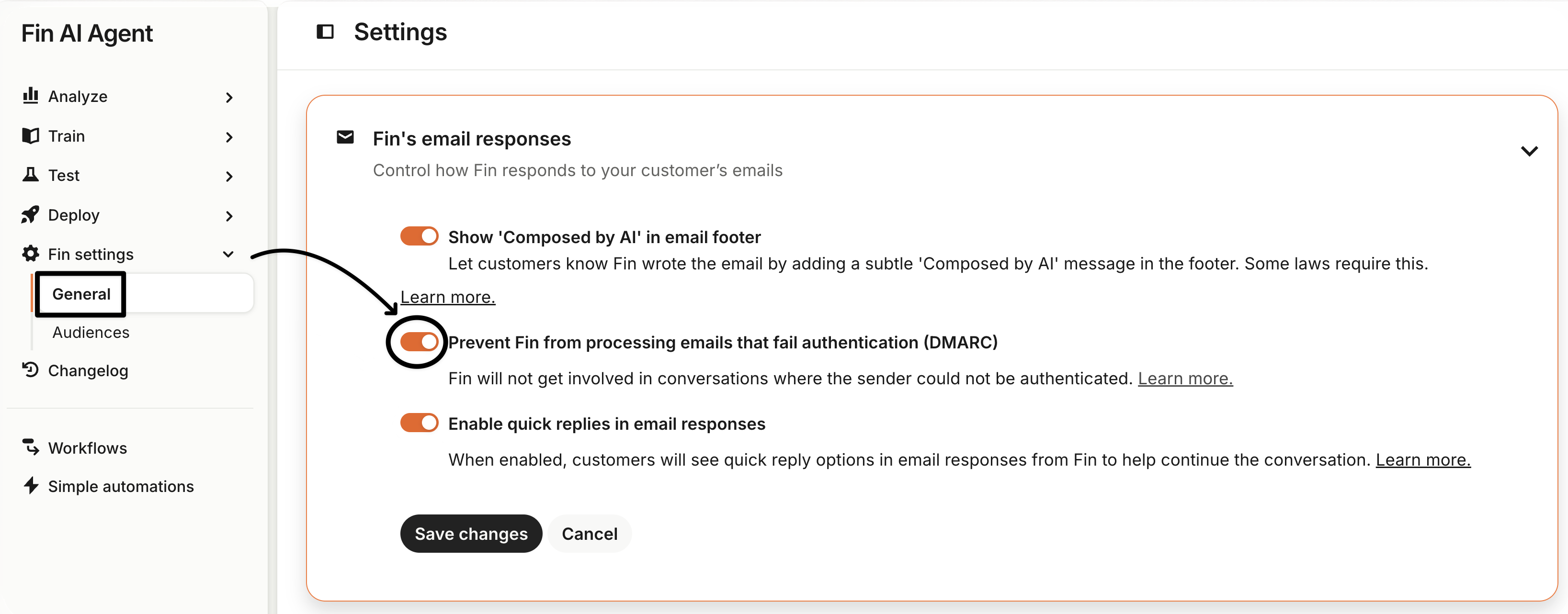
DMARC authentication setting

Note: This also stops Fin from responding to anyone with an unauthenticated email setup. Those conversations stay unassigned until a teammate reviews them, so it’s worth setting up an inbox view for unassigned, open email conversations to catch them.

See How to enhance email security with DMARC authentication for the setup steps.



What’s next?

You’ve set Fin’s tone for email and locked down authentication, so what now?

Ready to go deeper?

This lesson is part of the full Expand Fin to Email course, covering training, deployment, and post-launch monitoring.
πŸ‘‰ Take the full course

About this course


On any channel, Fin draws on the same help content to answer questions. What changes is how it should behave to fit that channel’s norms, and shaping that behavior is the job of Guidance. Here’s what needs to be adjusted for email.

Prerequisites

Before training Fin for email, make sure you're ready to go.

  • Fin deployed on chat: In most cases, it's better to already have Fin AI Agent live on your chat channel before expanding it to email. If you haven’t set Fin up yet, take the Launch Fin course to get started.
  • Email channel set up: To deploy Fin over email, you need to connect you email channel first.

Video transcript

Over email, Fin needs to know how to speak, which messages to ignore, and when a query needs the attention of a teammate. Let's head over to Train for a closer look. Out of the box, Fin will already adjust its style for email, but we can add guidance to reinforce this behavior and build on it. We can make sure Fin addresses every question a customer raised, not just the first one. Set exactly how Fin should sign off its replies and other details on how to follow our preferred style. Check below this video for a ready made example that you can copy, paste, and edit to suit your needs. We'll target only the email channel, This will override any of the defaults that we set previously when we were optimizing just for chat. While we're setting Communication style guidance, let's add this template too. If your help content ever advises customers to reach out to support, you'll want to make sure Fin doesn't echo that advice in an email reply, since that's exactly what the customer is already doing. There's a slightly higher risk of this over email because of the more thorough answers Fin provides on this channel. These are the touches that take Fin from writing a good email to writing one that sounds like it came from your team. Our team already knows not to waste time replying to newsletters, auto replies, promotions, and outright junk, and we want the same for Fin. We can add Spam guidance here targeted at just the email channel and describe in plain language what to mark as spam so that Fin only responds to genuine queries. If some unwanted mail still slips through and Fin tries to respond, we can fine tune our Spam guidance to catch it in future. It's also important to check Fin's Spam folder regularly for false positives or other non-support messages that we do want our teammates to see, like security reports or other important notices. We'll mark these as genuine and add the sender to an escalation rule so they go straight to the team instead. You can also tell Fin when to loop in a teammate for help without handing the whole conversation over. This is called Human in the loop, where you set when Fin should ask a teammate for input and then carry on to resolve the query by itself. If Fin's confidence in its answer falls below a threshold that you set, and any other conditions you've chosen are met like customer sentiment being low or a high risk topic, the reply is flagged to a teammate, either for a final review or with specific questions Fin needs help with. Like here, where Fin isn't sure of the exact price difference for this change to an order. A teammate can look it up and pass it back without the whole conversation being escalated. The teammate just gives Fin a helping hand. Fin can also ask a teammate to grab customer data or take a specific action on its behalf if you haven't yet set up the data connectors or the procedures for it to do it by itself. This way, Fin can still handle these queries in the meantime. So with Human in the loop, you can enable Fin to handle a far wider range of inbound email without giving up oversight or control. For email queries that you do want a teammate to handle end to end, it's worth tightening your Escalation Guidance and Rules. Escalation Rules are data driven, so you can use user information like a customer's plan and the issue type to trigger a handover, like high-value customers with a cancellation request. Escalation Guidance covers everything that you don't have a data point for. You just describe it in natural language like a customer mentioning legal action, and Fin will recognize it no matter how the customer words it. Take some time to define the situations you want sent straight to your team on this channel. These should be your highest risk or most complex scenarios, the ones you want your team spending the majority of their time on. With all these foundations in place, you've taught Fin not just what to say, but how to say it, what to ignore, and when and how to get help from your team. Next, we'll deploy Fin over email in a workflow and configure our final settings before going live.


Communication style guidance for email (example)

Here’s a ready-made guidance block for email tone and structure. Copy it in as a starting point, then edit and adjust it to suit your own voice. Just make sure it’s targeted at the Email channel only, so it doesn’t affect how Fin communicates over chat.

Copy and paste this guidance:

Write in a polished, complete, self-contained style. Avoid short, chat-like messages. Start with a brief acknowledgment, then address every question the customer raised: work through them in the order they were asked, and do not skip or combine questions in a way that leaves any unanswered. Use clear paragraphs or bullets, and include context the customer needs to act on your answer without following up.

Use a professional but approachable tone throughout. Avoid overly formal language, filler phrases like “Great question!”, or unnecessary repetition of what the customer said.

Always end replies with a closing line similar to this: “Let me know if there’s anything else I can help with. We’re happy to assist.”


Strengthen spam filtering with DMARC authentication

To reduce spam further, you can add an additional layer of protection at the authentication level.

DMARC (Domain-based Message Authentication, Reporting, and Conformance) checks whether an inbound email actually came from the domain it claims to, catching spoofing and phishing attempts before they ever reach Fin.

Turning on Prevent Fin from processing emails that fail authentication (DMARC) blocks any email that fails this check from reaching Fin at all, so it never gets a reply.

DMARC authentication setting

Note: This also stops Fin from responding to anyone with an unauthenticated email setup. Those conversations stay unassigned until a teammate reviews them, so it’s worth setting up an inbox view for unassigned, open email conversations to catch them.

See How to enhance email security with DMARC authentication for the setup steps.


What’s next?

You’ve set Fin’s tone for email and locked down authentication, so what now?

Ready to go deeper?

This lesson is part of the full Expand Fin to Email course, covering training, deployment, and post-launch monitoring.
πŸ‘‰ Take the full course